


















TV Stand Weight Capacity: How to Check It Before Mounting Your TV
TeamSICOTAS
TeamSICOTAS
0 comment

TV Stand Weight Capacity: How to Check It Before Mounting Your TV

Most TV stands look sturdy: thick wood and a product page claiming it fits TVs up to 100 inches. But a screen-size claim only says the cabinet is wide enough, not strong enough, and that gap is where cracked shelves and sagging top panels come from.
This guide shows you how to check a TV stand’s weight capacity the way someone who has to live with the result would: real weights, separate surface ratings, and what to do when a listing publishes no numbers.
A TV stand earns its place by holding the full setup.

Start With the TV’s Actual Weight, Not Its Screen Size

The first number to find is your TV’s weight, not its diagonal. Screen size misleads: a modern 75-inch OLED can weigh less than an older 55-inch plasma, because panel technology matters more than inches.
Find it on the manufacturer’s spec sheet or the model sticker on the TV’s back. When in doubt, weigh yourself on a bathroom scale holding the TV, then subtract your own weight. Include the feet or pedestal, because that hardware adds pounds too.
Then add everything else: the soundbar, game console, cable box, center-channel speaker, game cases, and decor. Each is small alone, but together they add 15 to 30 pounds. People remember the TV and forget the little boxes, which is how stands end up overloaded.
The spec sheet gives you the TV’s weight in seconds.

One Capacity Number Is Never Enough

Here is the most common trap: the listing gives one weight capacity, and buyers assume it covers the whole cabinet. In practice, the published rating almost always applies to the top surface only. The shelves have their own, usually lower limits.
This is not theory. A brand expert answering questions on a retailer’s site gave one stand’s ratings as 75 pounds for the top and 40 pounds for each lower shelf. That is the pattern: the top takes the TV, the shelves take lighter gear.
Surface
What it usually carries
How the rating behaves
Top panel
The TV, sometimes a soundbar
The published number usually refers to this surface
Open shelves
Consoles, cable boxes, streaming devices
Often a separate, lower limit per shelf
Adjustable shelves
Smaller gear, games, media
Lower still, and affected by how the shelf pins sit
Inside drawers or cabinets
Remotes, cables, stored items
Rarely rated; stored weight still counts toward the frame load
When a listing gives no per-shelf numbers, that is the honest signal: the manufacturer has not published them, and you should not invent your own. Check the manual, ask support, and keep shelf loads light until you have a real number.
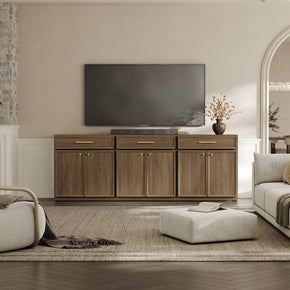
The published capacity usually describes this surface only.

Where the Weight Sits Matters More Than the Total

Two stands can carry the same total weight and fail very differently, because what matters is where the weight concentrates. A TV does not press evenly across the top panel. Its whole mass lands on two feet, or one center pedestal, in a small area, which is why top panels bow in the middle while the corners stay level.
The warning sign is sagging. One buyer reported a stand’s top shelf visibly bowing under a 65-inch TCL; another noticed a glass top dipping in the middle until it touched the center support bar, even though the TV weighed only 78 pounds. Rated screen size did not protect them. Actual weight, sitting in the middle of a long span, bent the surface.
The fixes follow the physics. Keep the TV’s feet near the stand’s side supports instead of floating near the center. If the top sags with no center support, a small hidden wood block under the middle works as a center leg. Center the TV left to right.
Centered, with feet near the side supports.

Base Support: What Holds It All Up

Under the top panel, construction decides how much abuse the load can take. A few details matter more than the cabinet’s style.
  • A full panel base or thick, evenly spread legs beat four slender corner legs. Weight landing between supports is weight the panel carries alone.
  • Solid wood and braced engineered wood outperform thin particleboard. Honeycomb-core panels, like the 35mm top and bottom on the Stria TV stand, spread load wider than their weight suggests.
  • 15mm side panels and shelves suit devices, not TV-weight loads. Adjustable shelves always carry less than the top.
  • A double-backed panel stiffens the cabinet against racking when the loaded stand gets bumped.
  • Assembly errors weaken everything. A loose cam lock or a skipped back panel turns a rated stand into an unrated one.
As a rough reference, one buying guide puts typical stands under 48 inches at 50 to 100 pounds, 50 to 70 inch units at 100 to 150, and the largest at 150 to 250 and up. Ballpark expectations, not promises — the manufacturer’s rating for your model always wins.

Uneven Floors Change the Math

A stand that is rock solid on a showroom floor can rock on yours. Older homes, crowned wood floors, and thick rugs tilt the cabinet slightly, shifting load toward the low side so one leg and corner carry more than their share. A tilt also makes tip-over easier if a child pulls on a door.
Check with a spirit level across the top before the TV goes on. If it rocks, fix the floor contact first — leveling feet or a shim under the low leg. Never load a rocking stand and hope weight settles it; weight amplifies the stress on the joints.
A level check takes a minute.

The Mounted-TV Caveat

Wall-mounting the TV above the stand changes the calculation. Once the TV hangs on a wall bracket, the stand no longer carries the screen; the wall and the mount do. The stand’s capacity then only needs to cover the devices and decor sitting on it.
The load simply moves. The mount, the wall anchors, and the wall now carry the TV, and only the mount’s own published rating tells you what it can hold. A modest-rated stand can still be the right pick under a wall-mounted TV, as long as the mount side is rated and installed per its manual.
Wall-mounted TV above: the stand carries only the devices.
Worked Example: The 77-Pound Rule
The Stria TV Stand with Storage up to 100Inch TV is the one SICOTAS model with a published number: its top panel is rated for 77 pounds, confirmed in the product page Q&A, where an owner with an 80-pound TV was told that exceeds the limit. Run your numbers against 77. A 60-pound TV plus a 10-pound soundbar and 5 pounds of decor totals 75, which fits with almost no room to spare. A 75-pound TV with the same gear totals 90 pounds, which fails, and an 80-pound TV fails before you add a single device. That is the value of a real rating: the math does not flatter your setup.

A Weight Worksheet You Can Fill In

Do this on paper before you buy. List every item that will live on the stand, note which surface it sits on, and add them up per surface. Treat the rating as a ceiling, not a target, and keep your total comfortably beneath it.
Item
Surface
Your weight (lbs)
TV (with feet or pedestal)
Top panel

Soundbar
Top panel or shelf

Game console
Shelf

Cable or streaming box
Shelf

Center-channel speaker
Top panel or shelf

Decor, books, stored items
Shelf or cabinet

Total load
All surfaces

Stand rating for your model
Top vs each shelf

Room under the rating
Your buffer, by choice

If your total meets or beats the rating, the answer is no, no matter how much you like the stand. If the stand publishes no rating, the worksheet still shows you exactly what number to ask support for, instead of a vague question getting a vague answer.

SICOTAS TV Stands: What We Know About Weight Ratings

Here is the honest state of published ratings across the current TV stands lineup. Three models have verified numbers from product Q&As or assembly manuals. The rest do not publish one, and this article will not invent numbers for them.
Model
Size
Published weight rating
What to do
30.9"W x 34.1"H x 15.6"D
Top panel: 77 lbs max (PDP Q&A). Shelves: not published.
Run your TV plus top-surface gear against 77 lbs. Keep shelf loads light.
59"W x 26"H x 15.5"D
70 lbs weight limit (assembly manual). Shelves share that limit; keep heavy gear on the top.
Check the manual for per-shelf splits. Middle section is 23" wide, end sections 15" each.
Savanna TV Stand, 4 Doors
61.5"W x 25"H x 15.6"D
Top surface: 165 lbs max; each shelf: 33 lbs max (assembly manual).
A properly separated rating: heavy receiver on top, lighter gear per shelf.
30"W x 34"H x 14"D
None published.
Same approach: get the numbers from support, and distribute gear across top and shelves.
Prelude Modern TV Console for TVs Up to 95 Inches
29.2"W x 33.5"H x 14"D
None published.
Ask support for the top and shelf ratings before loading a heavy TV.
Choose the Stria when you want a verified number to plan around: 77 lbs on the top panel per its product Q&A, with 35mm honeycomb top and bottom panels and a double-backed cabinet. One honest note: it has no cable management holes, so route cords around the back.
For models without published ratings, message support with your worksheet totals and ask for the top-panel rating and each shelf rating in writing. Until you have those numbers, keep the TV modest, spread devices across shelves, and never stack everything onto one surface.
Without a published rating, keep shelf loads light and ask.

The Pre-Purchase Checklist

Run through these in order. If any step fails, stop and resolve it before the TV goes on the stand.
  1. Weigh the TV with feet or pedestal attached, via the spec sheet or a scale.
  2. Add every device, speaker, and decor item to the surface it will sit on.
  3. Find the manufacturer’s rating for the top panel and each shelf. One number is not enough.
  4. Confirm the rating covers your totals with comfortable room to spare.
  5. Check the TV’s feet sit fully on the top panel, near the side supports, not overhanging.
  6. Level the empty stand on your actual floor and fix any rock before loading it.
  7. Anchor the stand to the wall with an anti-tip strap if you have kids or live with earthquakes.
  8. Re-check after assembly: loose cam locks and a missing back panel cut the real strength.
An anti-tip strap is cheap insurance once the stand is loaded.
Inspect joints and hardware after assembly.

Choose a Stand You Can Verify

A TV stand is one of the few furniture pieces where guessing has a cost. Weigh your setup, split the load across surfaces, demand separate ratings, and check the floor underneath. Three SICOTAS models publish real numbers — Stria (77 lbs top), Savanna Shelves (70 lbs), Savanna 4-Door (165 lbs top / 33 lbs per shelf). For the rest, ask support and buy once you have the numbers in writing.
The right stand is the one whose ratings match your worksheet.

FAQs

How much weight can a TV stand hold?
It depends on the model. As a rough industry reference, stands under 48 inches wide often land in the 50 to 100 pound range, 50 to 70 inch stands in the 100 to 150 range, and the largest units at 150 to 250 and up. Always check the manufacturer’s rating for the exact model, because construction varies widely.
Is the weight capacity the same for the top surface and the shelves?
No. The published rating almost always covers the top surface only; shelves have separate, lower limits. One retailer’s brand expert gave a stand’s ratings as 75 pounds on top and 40 per lower shelf. If a listing shows one number, ask what it covers.
How do I know if my TV stand can support my TV?
Weigh the TV with its feet attached, add every device and decor item per surface, and compare each total against its rating. Sagging or bowing in the middle of the top panel is the classic sign the load is too much.
Do I need to count my soundbar, speakers, and game console in the weight limit?
Yes. Every item counts toward the load on its surface. Small devices add up fast, often 15 to 30 pounds across a full setup, and heavy items inside cabinets count toward the frame load too.
What happens if my TV is too heavy for the stand?
The top panel bows or sags in the middle, joints loosen over time, and the stand gets more likely to tip. An owner with an 80-pound TV was told it exceeds the Stria stand’s 77-pound top-panel limit. An overloaded stand is a replace-the-stand problem, not a wait-and-see one.
Can I reinforce a TV stand to hold a heavier TV?
Small improvements help at the margins: a hidden wood block under a sagging span works as a center leg, wall anchoring stops tipping, and spreading the load across shelves helps. But reinforcement cannot turn an unrated stand into a rated one. If your TV clearly exceeds the rating, buy a stand rated for it.
If my TV is wall-mounted above the stand, does the stand’s rating still matter?
It matters for what sits on the stand: devices and decor. The TV’s weight moves to the wall mount, so the mount’s own published rating and installation instructions decide that side. Check both numbers.
Do SICOTAS TV stands publish weight ratings?
Three do. The Stria TV Stand with Storage up to 100Inch TV publishes a 77-pound top-panel rating, confirmed in its product page Q&A. The Savanna TV Stands with Shelves carries a 70-pound weight limit per its assembly manual. The Savanna TV Stand with 4 Doors is rated for 165 pounds on the top surface and 33 pounds per shelf, also per its manual. The Prelude console and the Savanna TV Stand with Drawer do not publish ratings, so check the manual or ask support for the top and per-shelf numbers before loading them.


Looking for something else?

New Home Furniture Essentials: What to Buy First, Room by Room

New Home Furniture Essentials: What to Buy First, Room by Room

LEARN MORE
26 Bedroom Coffee Bar Ideas That Actually Work at Home

26 Bedroom Coffee Bar Ideas That Actually Work at Home

LEARN MORE
How to Choose a Wardrobe That Fits Your Room and Your Clothes

How to Choose a Wardrobe That Fits Your Room and Your Clothes

LEARN MORE
Velvet Furniture: How to Judge Quality Before You Buy

Velvet Furniture: How to Judge Quality Before You Buy

LEARN MORE

Read more from Blogs

Looking for something else?

21 Tiny Bedroom Ideas for Adults to Save Real Space

21 Tiny Bedroom Ideas for Adults to Save Real Space

LEARN MORE
What Is Reclaimed Wood? Sources, Benefits, Risks and Buying Tips

What Is Reclaimed Wood? Sources, Benefits, Risks and Buying Tips

LEARN MORE
How to Decorate a Hall Tree: 10 Entryway Ideas That Actually Work

How to Decorate a Hall Tree: 10 Entryway Ideas That Actually Work

LEARN MORE

Read more from Blogs

You may also like

Savanna Console Table
$149.99
-4%
Savanna Shoe Cabinet, 2 Doors
Regular price $239.99 Save 4% Sale price $229.99
Cas Black Shoe Cabinet Entryway
$259.99
-12%
Cas Shoe Cabinet with Storage
Regular price $294.99 Save 12% Sale price $259.99
-12%
Savanna Entryway Bench
Regular price $169.99 Save 12% Sale price $149.99
-3%
Savanna Tall Shoe Cabinet,30 Pairs Shoes
Regular price $319.99 Save 3% Sale price $309.99

Further reading