



How to Choose a TV Stand for an Ultra-Short-Throw Projector
Saturday morning, box cutter in hand. You lift the laser TV out — twenty-some pounds of matte-black confidence — and rest it on the stand already in your living room. Power it on: the image blooms across the wall, enormous, cinematic. And the top of it is eating your ceiling.
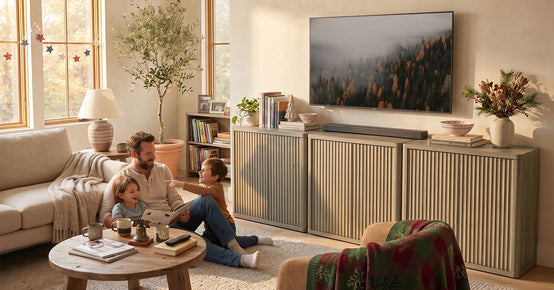
Nothing's broken. It's the stand. With a UST projector, the console becomes part of the optics — deciding where every pixel lands, how hot the chassis gets, whether the cables behind the box survive the bend. Height, depth, airflow, cable room. The numbers nobody prints on the box.
Why a UST Projector Plays by Different Rules

A regular projector sits across the room and throws light forward. A UST projector sits inches from the wall and throws it upward at a steep angle — one difference rewriting every furniture rule you thought you knew. Today's laser TVs run throw ratios around 0.19:1 to 0.25:1 — the XGIMI MIRA throws a 100-inch image from just 7.6 inches away.
Since the beam travels upward, the projector's height off the floor locks in the image height on the wall: console two inches taller means picture two inches higher. Most laser TVs have a vertical offset of 114 to 124 percent, so the image starts well above the lens — like it or not, every inch of console height becomes an inch of image height.
Throw Ratio in Plain Inches

Throw ratio is throw distance divided by image width. A 0.2:1 ratio puts the lens at one-fifth of the image width from the screen. Real-world numbers: current models land a 100-inch image from 8 to 14 inches of wall-to-lens distance, a 120-inch image from roughly 12 to 17. Every manufacturer measures UST throw a little differently, so published figures come in shorter than raw math suggests.
The console has to fit inside that wall-to-lens gap. Projector needs 14 inches and the console is 15 deep? One inch of margin — tight but workable. Need 17 inches but the console is only 14? Then you're bridging it, letting it overhang, or going back to the store. Pull the throw chart for your model — ratios drift 5 to 10 percent between brands.
Start with the Projector's Footprint

Measure the box before you measure the console. Most UST chassis measure 20 to 24 inches wide, 13 to 15 deep, 5 to 6 tall, weighing 20 to 30 pounds. Picture a carry-on suitcase — one that must sit fully supported, never hanging past the front edge.
Then factor in what everyone forgets — two to three inches of rear clearance for cable bends and exhaust, plus side room for focus controls. With cables plugged in, a 14-inch-deep projector genuinely needs 17 to 18 inches of usable top. Pull the width, depth, height, and weight off the spec sheet — everything below builds on those four numbers.
Depth Is Where Setups Go Wrong

A typical living-room console runs 15 to 18 inches deep. It was designed for flat TVs. A UST setup needs 20 to 24 inches of wall-to-lens clearance for a 100 to 120 inch image. That gap — between what furniture stores sell and what laser TVs actually demand — is where most setups quietly die, or end up perched on a wobbly bridge board.
Here's the honest math: published wall-to-lens distance plus 2 to 3 inches of rear clearance equals your minimum usable top depth. Come up short and your options are: pull the console off the wall (ugly, eats floor space), add a genuinely rigid bridge (any flex means focus drift), or buy deeper.
|
Target screen |
Image width (16:9) |
Wall-to-lens distance |
Usable top depth |
|
100 inches |
≈ 87 in |
8-14 in |
14-18 in |
|
110 inches |
≈ 96 in |
10-15 in |
16-20 in |
|
120 inches |
≈ 105 in |
12-17 in |
18-24 in |
Height Decides Where the Screen Lands

For a typical 120-inch image, the projector lens wants 10 to 14 inches of height off the floor. That's why every home-theater guide lands on the same window — a console 18 to 24 inches tall for most 100 to 120 inch setups.
With a 30-inch entertainment center, the top of a 120-inch image can hit an 8-foot ceiling before the picture reaches full size. Going lower is safer — lens stays low, image fits under the ceiling, screen bottom lands near seated eye level.
Quick check: console height plus chassis height. For a 120-inch screen that sum should sit near 10 to 14 inches of lens height, a few inches higher for 100 inches. Total over 20 inches? Measure that ceiling first.
Let the Heat Escape Somewhere

Laser light sources are efficient, not cool. Current UST models typically pull 150 to 300 watts, and most of it becomes heat. Trap the projector in a closed cabinet and the fans sound like a hair dryer while the electronics throttle down.
Good rule of thumb: about 10 cubic feet per minute of airflow per 100 watts. An open back beats a closed one. Slatted doors beat solid slabs, and a removable rear panel beats whatever ventilation trick the listing brags about. Keep the exhaust path clear — closed storage is for remote controls, not projectors.
Cables Need Room to Bend

In marketing photos, a UST projector looks wireless. In a real living room it needs power, at least one HDMI, sometimes Ethernet or optical audio — with every plug jutting two to three inches out the back before the cable can turn. HDMI connectors hate sharp bends — one small detail that turns a perfect-on-paper fit into a projector shoved six inches forward.
Treat cable features like dimensions when you shop: rear pass-through holes, or a back-edge grommet for cords to drop straight through. Right-angle HDMI adapters can claw back an inch or two in a pinch — a patch, not a plan. And don't forget the power brick — many laser TVs ship with an external brick the size of a paperback that needs its own ventilated spot. Map the cable route before the console arrives, not after.
Front-Heavy Brings Vibration and Leveling Trouble

UST projectors carry their lens assembly toward the front of the chassis — front-heavy like no flat TV ever was. Twenty-five pounds of forward-biased weight at the front edge of a light console means tipping risk plus micro-vibration — a faint shimmer in the image when the bass hits.
The fixes are roughly as glamorous as plumbing. First the stability test — park the projector where it'll live and press gently on the console's front edge. Any rocking means a deeper, heavier piece — or wall anti-tip straps. No exceptions with kids or pets in the house. Second, leveling. UST geometry punishes tilt brutally, turning the image trapezoidal, so leveling feet plus a five-dollar bubble level is the cheapest calibration purchase you'll ever make. Third, mass damps vibration — the flimsy flat-pack special is not your friend.
The Matte-Top Rule Nobody Tells You About
Inches from the wall, the projector blasts light upward, and some spills onto the console top right in front of the lens. A glossy or glass top throws that spill onto the screen or ceiling — washed-out contrast, faint ghost images. Even an expensive ambient-light-rejecting screen can't reject light coming from your own furniture.
The fix is a matte or satin finish. Already own a glossy console? A thin matte-black runner under the projector soaks up the spill for a few dollars. Do the flashlight test first — at night, from your seat, sweep your phone's light across the console top. Any bright streak is contrast you're donating to the ceiling.
Two SICOTAS TV Stands, Measured Against a UST Setup
Two real TV stands, scored for laser TV duty.
|
Spec |
Stria TV Stand with Storage |
Savanna TV Stand for 65Inch TV |
|
Overall dimensions (W x H x D) |
30.9 in x 34.1 in x 15.6 in |
61.5 in x 25 in x 15.6 in |
|
Top panel load rating |
77 lbs |
Check the PDP for the current rating |
|
Cable management |
No dedicated cable holes (per PDP Q&A) |
Cable pass-throughs included |
|
Best UST screen size |
80-90 in (height limits larger images) |
100 in (height sits in the ideal window) |
|
Depth verdict |
15.6 in — plan rear clearance carefully |
15.6 in — plan rear clearance carefully |
Setting up a 100-inch laser TV? Start with the height window. At 25 inches tall, the Savanna TV Stand for 65Inch TV is the natural partner — its 61.5-inch top swallows projector plus soundbar with room to spare. Check the 15.6-inch depth against your model's wall-to-lens number.
The Stria TV Stand with Storage runs 34.1 inches tall, which suits the 80 to 90 inch image range better. Its 77-pound top panel carries any current UST chassis with margin, though with no dedicated cable holes you'll plan the cord route yourself.
Your UST Fit Worksheet Worth ten minutes on paper before spending a dollar:
● 1. Note projector width, depth, height, weight — plus the wall-to-lens distance for your target screen size.
● 2. Add 2 to 3 inches of rear clearance to the projector depth: that's your minimum usable console depth.
● 3. Console height plus chassis height should land near 10 to 14 inches of lens height for a 120-inch screen, slightly higher for 100 inches.
● 4. Check the ceiling: with your lens height and the projector's vertical offset, does the whole image fit?
● 5. Confirm a matte top, or plan a matte runner — and flashlight-test it first.
● 6. Map every cable — power, HDMI, audio — and confirm bend room plus a route to the outlet.
● 7. Verify ventilation: open back or vented panels at the exhaust side.
● 8. Run the stability test — press the front edge; zero rocking allowed.
● 9. Level the top with a bubble level before touching the focus.
A laser TV is a satisfying upgrade — a hundred-plus inches from a box the size of a suitcase. The projector gets all the glory, but the console does the quiet structural work — right height, room for cables, dead still when the bass hits. Measure twice, buy once— you'll be glad you did.
FAQs
I've got a UST projector — how tall should the TV stand be?
For most 100 to 120 inch setups, aim for 18 to 24 inches tall — low enough to keep the image under a standard 8-foot ceiling, screen bottom near seated eye level. Past 30 inches, a 120-inch image top starts fighting the ceiling.
What depth do I actually need for a 120-inch laser TV?
Count on 18 to 24 inches of usable top depth — wall-to-lens distance (12 to 17 inches for a 120-inch image) plus 2 to 3 inches of rear clearance. Most standard consoles top out at 15 to 18 inches of depth, so verify before buying.
Can I keep using the TV stand I already have?
Sometimes — run the checklist. Is the top deep enough for the projector plus rear clearance? Is the height in the 18 to 24 inch window? Matte top rather than glossy? Does it pass the front-edge stability test? Fail on depth or height, and a new console usually costs less than the workarounds.
Does a glossy console top actually hurt the picture?
It won't harm the projector, but it washes out contrast — spilled light bounces off the glossy surface onto the screen or ceiling as faint ghost reflections. Matte or satin finishes avoid the problem entirely, and a matte-black runner under the projector is a cheap fix.
Can a UST projector overheat inside a closed cabinet?
It can — laser models pull 150 to 300 watts, and a sealed cabinet traps all that heat. Expect loud fans and thermal throttling. Keep the projector on an open top or in a vented cubby with around 10 CFM per 100 watts, and never block the exhaust.
What weight rating should the stand have?
Most UST chassis weigh 20 to 30 pounds, biased toward the front edge. Shop for a top rating comfortably above that — the Stria's 77-pound top panel carries any current model with margin — and always run the front-edge press test.
Throw ratio — what is it, and how do I use it for placement?
Throw ratio is throw distance divided by image width. The raw math for a 0.2:1 projector on a 100-inch 16:9 image suggests about 17 inches, but published wall-to-lens numbers run shorter — around 8 to 14 inches. Use your own mode's throw chart, since ratios vary 5 to 10 percent between brands.
Between the two SICOTAS stands, which suits a UST setup?
For a 100-inch laser TV, go with the Savanna TV Stand for 65Inch TV — twenty-five inches tall puts it right in the ideal height window, and the 61.5-inch top fits the projector plus a soundbar. The 34.1-inch-tall Stria suits 80 to 90 inch setups better. Both run 15.6 inches deep, so double-check rear clearance.


Looking for something else?

One-Drawer vs. Two-Drawer Nightstands: Which Is More Useful?
LEARN MORE
Adjustable vs. Fixed Bookcase Shelves: Which Is Better for Real Storage?
LEARN MORE
How to Choose a Dresser for Sweaters, Denim, and Bulky Clothes
LEARN MORE
Mixed-Depth vs. Uniform Dresser Drawers: Which Layout Fits Your Wardrobe?
LEARN MORELooking for something else?

How to Choose a Low Dresser for Under a Bedroom Window
LEARN MORE
How to Choose a Dresser for a Rental: Assembly, Moving, and Wall Anchoring
LEARN MORE
How to Choose a TV Stand for an Ultra-Short-Throw Projector
LEARN MORE


Further reading

Small Bedroom Furniture: What to Keep and Skip

Large Bedroom Ideas: How to Fill a Big Room Well


