
















TV Stand Height Guide: Find the Perfect Height for Your TV
Look. Picking a TV stand sounds simple, doesn't it? Until you've done it. Then one of three things happens. Either the screen ends up at the wrong eye level, sits awkwardly low like it's hiding from the room, or pokes out past both sides of the stand like an overstuffed sandwich. Most folks shop the finish and the doors. That's fair, those matter. But height is what your neck will remember at 11 PM during the TV episode. This TV stand height guide covers the actual math, a size chart you can screenshot, and the real-world fixes most articles skip over. Whether it's a 32-inch in the spare bedroom or a 75-inch beast in the den, you'll know what stand height fits your couch. Grab a tape measure.
Why TV Stand Height Matters

Height is the boring detail nobody ever brings up at the showroom. Doesn't matter, though. It's the one variable that decides whether your neck is fine after a two-hour movie or you're stretching it out the next morning, wondering what went wrong. A few inches off and the whole room feels weird in a way you can't quite put your finger on.
It Affects Comfortable Viewing
Your eyes are lazy. Not insulting them, that's just biology. They want the middle of the screen at about the same height as they already are when you're on the couch. Hit that line within an inch or two, and watching feels automatic. You barely register the screen position. Miss by mo, more than that, and your eyes burn through energy hunting for the action. Fine for a 90-second YouTube clip. Brutal across the entire Lord of the Rings trilogy.
It Helps Prevent Neck Strain
Mount the TV too high, and your neck spends the whole night tipped back. It absolutely will let you know about this the next morning. Slightly low is okay, actually preferred, since the eyes naturally settle a bit under the horizon. Caught between the two options? Go lower. Always.
It Changes How the Living Room Feels
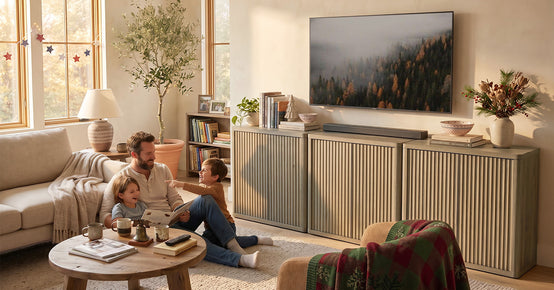
Think of a properly sized media console the way you'd think about a rug. The rug grounds the couch. The console grounds the TV. Choose one that's too tall, and the screen looks like it's hovering above the wall. Too short, and a big TV looks like it's one wagging dog tail away from disaster. Once the proportions click, you stop noticing the furniture at all. That's basically what people mean when they call a room “finished.”
The Simple TV Stand Height Formula

No guessing required. The whole formula boils down to three quick measurements and one subtraction. Less math than checking out at the grocery store. Run it once, write the answer on a sticky note, and you can scroll the Sicotas modern TV stand collection with real numbers in hand instead of just crossing your fingers.
Step 1: Measure Your Seated Eye Level
Sit on the couch the way you'd sit on a Saturday night. Not the polite, upright posture you reserve for company. Grab a friend (or balance the tape measure yourself) and measure from the floor to the center of your eyes. For most adults on a regular sofa, this number lands somewhere between 38 and 42 inches.
Step 2: Measure the Actual TV Screen Height
Forget what the box says about screen size. That number is the diagonal, basically a marketing figure. It doesn't really help you here. What you actually need is the top-to-bottom screen height, no built-in feet involved. A typical 55-inch screen runs about 27 inches tall. A 65-inch comes in at roughly 32. Double-check the manufacturer's spec sheet if your model is off-brand.
Step 3: Divide the TV Height by Two
Half of that height gives you the distance from the screen's bottom edge to its dead center point. 32 divided by 2 equals 16. A calculator app on your phone is fine—no shame in that whatsoever.
Step 4: Subtract Half the TV Height from Your Eye Level
Here's the formula spelled out:
Ideal TV stand height = seated eye level minus half the TV screen height
Whatever number that gives you, that's roughly where the top of your stand needs to sit. Give or take an inch. Trying to nail it to the millimeter? Nobody else will ever notice. Save the obsession for something more important.
Quick Example Calculation
Quick real-world example. Your seated eye level: 41 inches. Your 65-inch TV is roughly 32 inches tall, so half of that is 16. Subtraction: 41 minus 16 equals 25 inches. That's the sweet spot. Anything between 23 and 27 inches will work well and keep your screen centered near eye level (and your neck out of the chiropractor's office).
TV Stand Height Chart by TV Size

Skipping the math entirely? Totally fair. Use the chart below as a cheat sheet. It pairs common TV sizes with stand widths and heights that work for most American living rooms. The numbers are starting points, though, not rules carved in stone. Your sofa height and where you actually park yourself still get the last word.
|
TV Size |
Actual TV Width |
Recommended Stand Width |
Recommended Stand Height |
Best For |
|
32" |
28–30" |
34–38" |
22–26" |
Small bedrooms, dorms |
|
43" |
37–39" |
44–48" |
24–28" |
Bedrooms, secondary rooms |
|
55" |
48–50" |
55–60" |
26–28" |
Living rooms, apartments |
|
65" |
57–59" |
65–72" |
24–26" |
Family living rooms |
|
75" |
65–67" |
75–82" |
22–24" |
Large living rooms, theater rooms |
|
85"+ |
74–76"+ |
85–96"+ |
18–22" |
Open-concept spaces, home theaters |

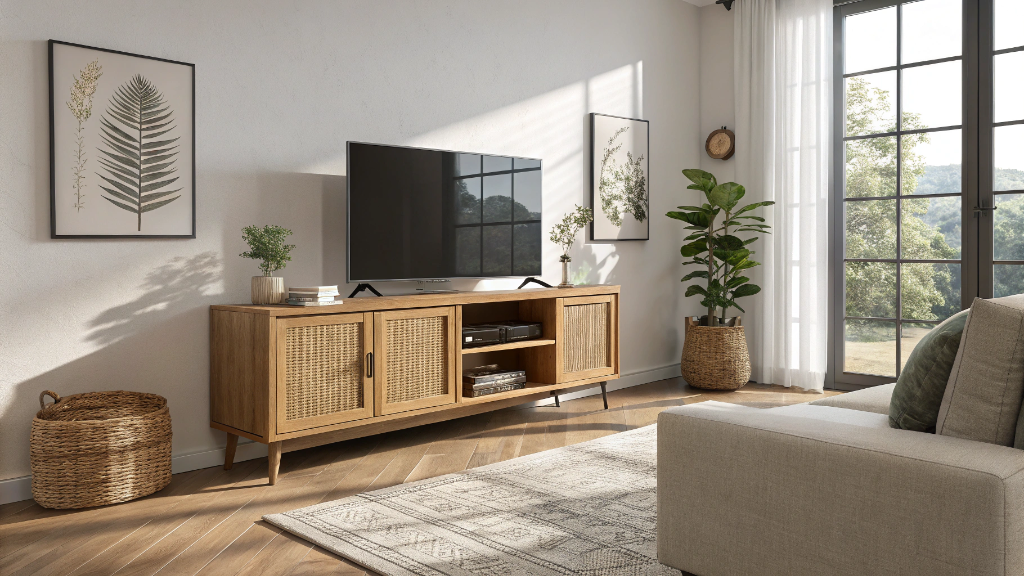
Notice the pattern? The bigger the TV, the shorter the stand. Sounds backwards. It's not. A larger screen adds height above the stand, so a shorter base brings the center back down to where your eyes already are. For a 65-inch setup, the Cas 65-Inch TV Stand with Cable Management falls squarely within the recommended width-and-height range. Plus, it hides the cable spaghetti behind closed doors. Worth the upgrade for that reason alone.
TV Stand Width Guide: Why Width Matters Too

Height keeps your neck happy. The width keeps the TV from tipping. Mess up either one and regret shows up within a week, sometimes sooner.
Your TV Stand Should Be Wider Than Your TV
Rule number one of TV stand shopping. The stand has to be wider than the TV. Plan for a total of 4 to 6 inches of extra width, which breaks down to 2 to 3 inches of cushion per side. And this isn't just for the photo. A TV hanging over the edges is a genuine tip-over hazard, especially in homes with toddlers, big dogs, or one of those friends who plays charades with full physical commitment.
Measure Actual TV Width, Not Diagonal Size
Quick reality check. A 65-inch TV is not 65 inches wide. That number is the diagonal, measured from one corner to the opposite corner. The real horizontal width sits closer to 57 inches, bezel included. Pull out a tape measure and go from left edge to right edge. Or just Google the model number and check the spec sheet on the manufacturer's site—both work.
Leave Extra Space for Soundbars and Decor
Got a soundbar parked in front of your TV? Add a few extra inches of width and depth to whatever your minimum was. The same goes if there's a small pothos plant, a framed photo, or one of those Anthropologie candles that's purely decorative. A slightly oversized stand always reads as deliberate. One squeezed exactly to the TV width reads as chea—big difference.
Avoid the Top-Heavy Look
Drop a 75-inch screen onto a 60-inch stand, and the whole wall just looks nervous, even if every bracket is bolted into a stud. Your eyes read proportion before they read safety. Bump up to a wider st, and the room suddenly looks adult-occupied. That's the entire—nock—no other secret.
How Viewing Distance Affects TV Stand Height

Distance and height are linked. Move the sofa closer, and the perfect stand height changes a little. Push it back, and the math shifts again. In bigger rooms where the TV is basically the main event, something like the Stria TV Stand with Storage handles screens up to 100 inches and gives you the wider footing larger spaces actually need.
Closer Seating Needs More Careful Height Placement
Small spaces leave zero room for error. Sofa sitting 6 to 8 feet from the screen? Every inch of stand height registers, loud and clear. Tiny placement mistakes feel enormous when the TV is practically in your lap. Measure twice. Drill once. Or, you know, click “buy” once.
Larger Rooms Can Handle Larger Screens
Bigger rooms (10 to 14 feet between the sofa and the screen) can accommodate a larger TV without the wall feeling overloaded. Pair the big screen with a wide, lower-profile stand. That spreads the visual weight out horizontally, instead of stacking it tall and narrow. Large rooms always handle horizontal better than vertical.
Resolution Affects How Close You Can Sit
If you've got a 4K, you can sit closer than the old 1080p folks ever could. Pixels stay invisible at shorter distances. RTINGS suggests sitting about 1.6 times the diagonal of the screen away, which gives you a comfortable 30-degree field of view. Closer than that and you're basically front row at a movie theater. Fun once in a while. Exhausting day in and day out.
Use Viewing Distance as a Final Comfort Check
Once the calculations are done, sit where you actually plan to sit. Look at the wall where the TV's going. Does the neck have to bend up or down? Scrap the plan. Painter's tape on the wall is the cheapest reality check ever invented. Five minutes of testing saves a whole weekend of buyer's remorse.
Standard, Low-Profile, and Tall TV Stands

Not every stand suits every room. Match the type to your TV size, your sofa height, and whatever you actually do in movies, gaming, falling asleep ten minutes into a series, no judgment from me. For bedrooms or higher-seating setups, the Terra Tall TV Stand for 65-Inch TVs lifts the screen to eye level even when you're propped against a small mountain of pillows.
Low-Profile TV Stands

Under 21 inches tall. Right call for big TVs, low modern sofas, or any setup where the screen is wall-mounted and the stand mostly handles storage and looks. Low-profile keeps big TVs from inching their way upward across the wall.
Standard Media Consoles

Between 21 and 32 inches. The default category. Plays well with most regular-height sofas and any TV in the medium-to-large bracket. Roughly 80 percent of American living rooms end up here. Honestly, you can skip the overthinking on this one.
Tall TV Stands

Anything above 32 inches qualifies as tall. Best fit for bedrooms, kitchen-island spots with bar-height seating, or any room where viewers sit higher than normal. Important note: Pair tall stands with smaller TVs only. Stacking a big screen on top of a tall stand puts the picture near the ceiling. Nobody enjoys that.
Floating TV Stands

Wall-mounted consoles that hover above the floor. They look modern, vacuuming under them is a breeze, and small rooms feel bigger because there's more visible floor. One catch,h though. You need real wall studs or solid masonry anchors. Plain drywall plugs absolutely will not hold a TV plus accessories. Verify the weight rating on the stand and on your wall before you drill the first hole.
Entertainment Centers

The heavyweight category. Open shelves, closed cabinets, sometimes a faux fireplace tucked into the middle. Worth considering if you genuinely need storage for gaming consoles, books, board games, or that family DVD collection nobody publicly admits to having. They take up more space than a regular stand, an ar stand though. Measure the room twice before committing.
Best TV Stand Height for Different Rooms

Same formula, different rooms, completely different answers. Where you sit and how you change everything. If your viewing habits bounce around (living room movies one weekend, full home-theater mode the next), a modular setup like the Helio Modular TV earns its keep. Add sections when the wall demands more. Pull them off when the room shifts.
Living Room
Run the formula off your main sofa. If the room has a few seating options, optimize for the one you actually plant yourself in, not the showpiece accent chair nobody uses except guests. Most living room TV stands end up between 22 and 28 inches tall.
Bedroom
Bedroom TV is a whole different ballgame. You're propped up on pillows or fully horizontal, and both positions raise your sightline. Add 2 to 4 inches to whatever stand height you'd choose for a living room. Or just buy a taller stand designed for bedside use from the store—either works.
Gaming Room
Gamers generally prefer the screen to sit lower. Bean bags, floor cushions, racing-style chairs that look like Formula 1 cockpits, all of them keep you closer to the ground than a normal couch. Pair them with a low-profile stand. TV center at eye level. Never above.
Open-Concept Room
Half the household parked on the sofa, the other half standing at the kitchen island, and making snacks? You need a middle-ground answer. A TV center sitting about 45 inches off the floor handles both groups reasonably well. Nobody starts complaining mid-meal.
Recliner Setup
When the recliner kicks back, your eyes tilt up. The ideal screen position rises higher than it would for an upright couch. Add 2 to 4 inches to whatever the standard formula gives you. Or use a tilting wall mount that adjusts as needed. And honestly? Sit in both upright and fully reclined positions before drilling any holes. Reclining changes more than you'd expect.
What to Measure Before Buying a TV Stand

Five fast measurements before you hit checkout. Scribble them on the back of an envelope. Type them into the notes app on your phone. Either way works. Skip this whole step, and you'll be wrestling a too-small stand back into its original box two weeks later, hating life.
TV Diagonal Size
Helps narrow down the stand category. Not enough on its own, though. A 65-inch TV could measure 56 inches across on one brand and 59 inches across on another, depending entirely on bezel thickness.
Actual TV Width
Run the tape measure from left bezel to right bezel. This is the number that actually drives stand width. Add 4 to 6 inches to it. That total is your minimum acceptable stand width. Anything less and the TV station is overhanging.
Actual TV HeiFrom top
From the top edge to the bottom edge of the screen, excluding feet. The formula above needs this number. Without it? Back to guessing, which is exactly what we're trying to avoid here.
TV Stand Depth
Depth matters because the stand needs to hold the TV's base plus everything else that lives up front. Soundbar. Cable box. Gaming console. That ugly router you've been promising yourself you'd relocate for the past two years. 15 to 18 inches of depth handles most real-world setups.
Seated Eye Level
Floor to the center of your eyes, measured while you're actually parked on the couch. This is the single most important number in this whole guide. Skip it, and nothing else works. I mean it.
Other Features That Make a TV Stand More Useful

Dimensions cover 80 percent of the buying decision. The remaining 20 percent shows up in daily life. The cord chaos. The soundbar. The gaming stack. The cat who insists on inspecting every new piece of furniture as if it might be a threat. Shop the full Sicotas living room furniture range, and match the TV stand with coffee tables and side tables in the same finish. Keeps the room from looking like every piece came from a different thrift store.
Cable Management
Look for back cutouts, internal cable channels, or at least a pass-through hole or two. Skip this feature, and the area behind your TV slowly turns into a wilderness of HDMI cords, power bricks, and phantom chargers nobody admits to owning. Built-in routing handles all of that automatically.
Storage for Gaming Consoles and Media Devices
Open shelves let gaming consoles and streaming boxes breathe properly. They actually need that, especially the PS5 (which runs hot enough to warm a small room). Closed cabinets hide routers, orphan controllers, and that slightly embarrassing DVD collection from 2008 you can't quite throw away. The best stands offer both kinds of storage.
Soundbar Space
Got a soundbar in the mix? Measure the gap between the top of the stand and the bottom of the screen. The soundbar has to fit in there without blocking the TV's IR sensors, which is what your remote communicates with. Some stands come with a dedicated soundbar shelf, which takes one variable off your plate entirely.
Weight Capacity
Check the rated weight capacity every single time. Add up the TV, the soundbar, the consoles, and whatever else tends to accumulate inside a TV stand over the years. Stay well under the limit. The CPSC's AnchorIt campaign also pushes hard for anchoring tall furniture and TVs to the wall, especially in any household with kids.
Material and Style
Solid wood ages beautifully and feels substantial under a TV in the best possible way. Engineered wood with a decent finish costs less and performs fine in most rooms. Metal and glass lean modern, sometimes a little too sterile for a cozy space. Match the material to whatever else lives in the room. A TV stand that looks like it teleported in from a completely different house always reads as off.
Common TV Stand Height Mistakes to Avoid
Here are the slip-ups that show up in basically every first-time TV stand purchase. Avoid these few, and your room will already look more put-together than the average room.
Choosing a Stand Based Only on the Diagonal Size
The diagonal number sells TVs. It doesn't size TV stands. Measure the actual width and height of your TV before you go shopping, then pick a stand that sits a few inches wider than the TV on each side — not just total. That extra breathing room on either edge is what keeps the setup looking balanced instead of like the TV is about to tip over the side.
Placing the TV Too High

Mounting the TV above the fireplace photographs beautifully for real estate listings. In actual practice? Rough. The screen ends up well above eye level, and the neck registers that fast. If the layout absolutely forces you up there, use a tilting mount and angle the screen down toward the seating.
Using a Stand Narrower Than the TV
A TV that hangs over the edges of the stand is asking for trouble. It also just looks visually off. Pick a stand that's a few inches wide, that's then one each, every single time, no exceptions.
Forgetting About the Soundbar
A soundbar wedged between the stand and the TV bumps the screen up by an inch or two. That tweaks the formula. Account for it before clicking checkout.
Ignoring Future TV Upgrades
Most households replace TVs more often than they replace TV stands. So buy a stand that handles the next size up, not just the screen you've got today. Future-you sends a thank-you note. Maybe a fruit basket.
Skipping Wall Anchoring
Tall TV stands, big TVs, kids, pets, and a household that rearranges furniture every other season all work better with a wall anchor. Anti-tip kits run under twenty bucks and take 15 minutes to install. Cheap insurance against a really bad afternoon.
Quick TV Stand Buying Checklist
One last pass before checkout. Quick run-through:
- Height check. The TV center should land close to your seated eye level.
- Width check. The stand should be at least 4 to 6 inches wider than the TV.
- Depth check. Enough room for the TV base, soundbar, and media devices.
- Storage check. Open shelves for consoles, closed cabinets for clutter.
- Cable check. Built-in cable management or pass-through holes.
- Safety check. Confirmed weight capacity and anti-tip support if needed.
- Style check. Matches the rest of your living room or bedroom furniture.
Final Thoughts
A solid TV stand can do many jobs at once. Correct height for your eyes. Correct width for the TV. Cords hidden out of sight. Room for the soundbar, the consoles, and the remote that vanishes every Friday. So: start with the height formula. Double-check the width against your TV. Then choose the finish and features that match the room you actually live in, not the Pinterest version.
Style still matters. OH, obviously it does. But the prettiest TV stand on the internet is still the wrong one if your screen ends up six inches above your eye line. Measure the room first. Fall for the rattan doors second. That's the whole guide.
FAQs
What is the perfect height for a TV stand?
Whatever height lands the TV screen's center near your seated eye level. The formula? Seated eye level minus half the screen height. For most adults watching a 55- to 65-inch TV from a standard sofa, the answer comes out somewhere between 24 and 28 inches.
Is 29 inches too high for a TV stand?
Not always. 29 inches works fine for a smaller TV, a taller sofa, or a bedroom where you watch propped against a pile of pillows. Pair 29 inches with a 65-inch or 75-inch screen above a low, sectional couch, though, and the screen usually ends up too high for comfortable viewing.
Is it better for a TV to be too high or too low?
Slightly low wins, every single time. Your eyes naturally rest a touch below the horizon, so looking down a few inches feels totally neutral. Looking up for two straight hours is what gives you the headache by episode three.
Are all TV stands the same height?
Not even close. Stands range from 16-inch low-profile pieces to 36-inch-plus entertainment pieces as well as art pieces, plus floating wall-mounted units that sit in their own category. The right pick depends on your TV size, your sofa height, and how you actually use it day-to-day.
Can a TV stand be too low?
Sure, but it's rarely as uncomfortable as a stand that's too tall. If the screen sits well below eye level, you'll find yourself slumping or hunching forward to watch. For a really large TV paired with a tall sofa, a low-profile stand can drop the picture below where you actually want it.
What is the best height for a TV from the floor?
For most living rooms, the screen's center should sit roughly 40 to 42 inches off the floor. That's about the average adult's eye level on a normal sofa. Adjust upward for taller seating, downward for anything close to the ground.
Can you put a 65-inch TV on a 60-inch stand?
Technically, yes. A 65-inch TV is roughly 57 inches across, so it physically fits on a 60-inch stand. But 60 inches leaves almost zero breathing room on either side. Looks tight, feels slightly precarious. A 65- to 72-inch stand both looks better and feels safer.
Is 16 inches too short for a TV stand?
Depends. A 16-inch low-profile stand works great for very large TVs (75 inches and up), low sectional sofas, or any setup where the TV is already wall-mounted. Pair 16 inches with a small TV and a tall sofa, though, and the screen ends up noticeably too low.
Sources
- Slone Brothers Furniture – optimal TV positioning for eye-level placement and ergonomic viewing.
- RTINGS – TV size to distance calculator covering the 30-degree field-of-view rule.
- CPSC AnchorIt Campaign – TV tip-over safety guidance for tall furniture and television anchoring.
- U.S. Consumer Product Safety Commission – TV tip-over prevention — federal safety guidance for furniture and televisions.
- Inch Calculator – TV viewing distance calculator using THX and SMPTE viewing-angle guidelines.
- Tom's Guide – best TV viewing angle and height — middle-third focus rule and stand-height starting points.
- Mount-It – optimal TV height guide using the 22-percent viewing-distance rule.


Looking for something else?

Furniture Materials Guide: Picking the Right Material Room by Room
LEARN MORE
How to Mix Wood Tones Without Making a Room Look Mismatched
LEARN MORE
18 College Apartment Furniture Ideas That Save Space and Money
LEARN MORE
Types of Entertainment Centers: 11 Designs and How to Pick One
LEARN MORELooking for something else?

Curio Cabinet Decor Ideas: How to Style a Display Cabinet Without the Clutter
LEARN MORE
Curved Furniture: How to Style, Measure, and Buy It in 2026
LEARN MORE
What Is Rattan Furniture? A Buyer Guide to Types and Care
LEARN MORE


Further reading

How to Choose a Nightstand for a CPAP Machine

How to Choose a Shoe Cabinet for Men's Sizes, High-Tops, and Bulky Shoes


