



20 Small Media Room Ideas for a Cozy, Space-Smart Setup
Small media room ideas only work if they suit the room you already have. A spare bedroom. A basement corner. A wide landing. The end of a family room. Any of those can hold a good setup.
Compact rooms have one real advantage. Nobody sits far back. A modest screen still fills your view. The trouble shows up elsewhere. Glare on the panel, cords everywhere, sound slapping off bare walls. Controlling glare and screen brightness counts for more in a tight room than a large one.
Below are 20 small home theater ideas. Also the planning numbers, the sound setup, and the power details most guides skip.
Plan the Room Before You Buy Anything
Most small home theater projects break at the shopping stage. Someone orders the biggest sectional they can afford. Then the door will not open. Layout first.
Measure What You Actually Have
Write down wall width, room depth, ceiling height, and window positions. Add door swings, radiators, and outlets. Those last three kill more layouts than square footage does.
Pick the Screen Wall First
Choose the wall where daylight is easiest to control and where seating can naturally face the screen. A wall directly opposite a window is usually the worst choice. Everything else follows from this one decision.
Decide What Else the Room Has to Do

Very few small media rooms are only media rooms. If yours also handles work, guests, or gaming, plan for that now. Browsing home office furniture that shares a room well early saves you from buying twice.
Small Media Room Planning Numbers
Competitors rarely publish these. Start here, then adjust once you sit down in your own seats.
|
What to check |
Practical range |
Why it matters in a small room |
|
Screen center height |
Roughly 40 to 45 inches from the floor when seated on a standard sofa |
Set it by your seated eye level rather than by a fixed number |
|
Console height |
Screen center height minus half the screen height |
A stand that is two inches too tall tilts your neck up all evening |
|
Walkway behind seating |
About 24 to 30 inches |
Anything tighter turns a snack run into an obstacle course |
|
Gap between sofa and screen wall |
Enough that the screen fills your view without head turning |
Sit at your planned distance and test before you mount anything |
|
Space in front of a recliner |
Check the model's stated clearance |
Wall-hugger designs need far less than standard recliners |
|
Outlets on the screen wall |
At least one dedicated circuit outlet |
Media gear stacks up fast and one strip rarely covers it |
One correction worth making. You will see a claim that a media room needs 12 by 18 feet. That figure suits six seats and a full speaker layout. Two or three people in a spare bedroom need far less.
20 Small Media Room Ideas That Make Every Inch Count
1. Build the Room Around One Compact Sectional

An L-shaped sectional seats more people than a sofa and two chairs. It also fills a corner that would otherwise sit empty. Look through living room furniture scaled for tight floor plans before you settle on a size.
Measure the chaise arm against your door swing. That is the piece that catches people out.
2. Try a U-Shape Only in a Wide Room

A U-shaped sectional builds one clear viewing zone. No extra armchairs needed. It also eats up floor space fast. Save it for rooms that run wider than they are deep.
3. Use Modular Seating You Can Move

Modular sofas, ottomans, and floor cushions let one room shift from movie night to gaming to plain conversation. In a small space, flexibility beats seat count.
4. Choose Deep Seats Over Formal Ones

Media rooms are for sitting still for two hours. Seat depth and back support matter more than a tidy furniture arrangement. Deep cushions and a low back angle do most of the work.
5. Look at Wall-Hugger Recliners

Standard recliners need room behind them. Wall-hugger designs slide forward instead. The seat can then sit almost against the wall. Check the clearance number the maker prints. Do not guess it.
6. Float One or Two Light Chairs

Keep a pair of light chairs that turn toward the screen when guests arrive and turn back for conversation afterward. Nothing permanent, nothing heavy. Few changes buy this much flexibility for so little.
7. Mount the Screen and Drop the Bulky Cabinet

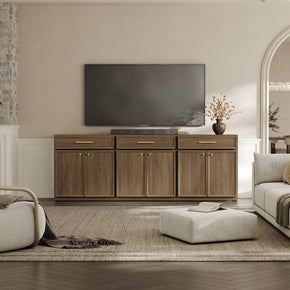
Wall mounting frees the floor and cleans up the sightline. You still want a surface underneath for gear, so pair the mount with a low-profile media console rather than a tall entertainment unit.
Mount at seated eye level. Above a fireplace looks good in photos and hurts your neck in practice.
8. Frame the Screen With Closed Storage

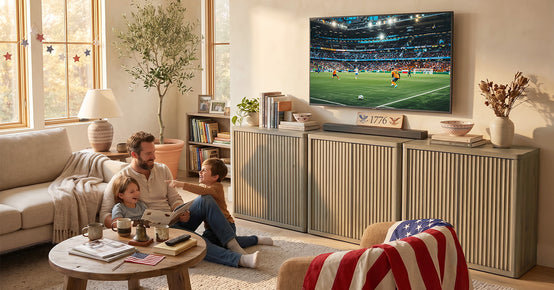
Cabinets on either side make a mounted screen look built-in instead of stranded. Consoles, controllers, discs, and remotes all disappear behind doors. An entertainment cabinet with doors handles most of it in one piece.
Keep the styling calm. Busy shelves compete with the screen every time you sit down.
9. Put the Screen in an Alcove

An awkward recess is a gift here. A recessed screen wall hides cables, kills side glare, and turns bad architecture into the focal point. Panel the back of the alcove in a dark tone for extra depth.
10. Skip the Coffee Table

A standard coffee table can take up the walkway you need. Nesting tables, C-tables, drink ledges, and storage ottomans all give you a surface without blocking the route to the door.
11. Choose a Storage Ottoman Over a Bench

An ottoman does three jobs. Footrest, extra seat, blanket storage. In a room this size, a piece that does only one job doesn't earn its floor space.
12. Route the Cables Through the Console

Nothing makes a small room look messier than loose cable. A TV console with built-in cable routing drags the whole tangle behind the cabinet, out of sight.
Mounted screens need a paintable raceway or in-wall rated cable. Power cords stay outside the wall unless the cord itself is rated to go in there.
13. Use Several Small Lights, Not One Big One

Spread the light across a few low sources. Sconces. A table lamp. A floor lamp. Maybe a strip inside a cabinet. Run them all through dimmers. First, check that the bulbs are rated as dimmable and match the switch. Plenty of LEDs are not.
14. Put a Soft Light Behind the Screen

A light strip behind the TV stops the wall going pure black. Eyes tire when a bright screen sits against a dark wall. Bias lighting narrows that gap. It costs almost nothing to fit.
Almost no movie room guide mentions this. It takes ten minutes to fit.
15. Control Glare Before You Decorate

Blackout curtains, adjustable blinds, and lamp position fix more picture problems than any setting buried in the TV menu. Shift bright fixtures out of the reflection zone opposite the screen.
16. Go Dark for a Cinema Feel

Charcoal. Deep navy. Olive. Warm brown. These soak up stray light and pull the room in around the screen. Dark walls suit a dedicated room best. Keep the lamps warm, or the space reads flat.
17. Pick Warm Neutrals if the Room Does Double Duty

Taupe, oatmeal, soft grey and raw wood hold up better when the room lives a second life in daylight. Manage glare with curtains and lamp placement. Painting everything black is not the only route.
18. Let a Desk Share the Room

A spare bedroom can hold a job all day and a film at night. Pick a desk with a drawer. Loose cables and stray controllers are what make a shared room look untidy. A compact desk with a drawer keeps the work half in check.
Angle the desk away from the screen wall. Looking at your own job during a film ruins the mood.
19. Zone It as Part of a Game Room

Split watching from playing with a rug, the way the furniture faces, and separate lighting. Two clear zones in one room work better than two cramped rooms. Keep the screen in view from the main seats.
20. Keep the Layout Simple

The best small entertainment room setups are rarely the busiest. One good screen hung at the right height. Seating you can sink into for two hours.
Light you can dim, sound that carries dialogue, doors for storage. That beats an entertainment center wall packed with theater furniture.
TV or Projector in a Small Media Room?
Bigger does not win by default. The deciding factor is how much light you can shut out.
|
Factor |
TV |
Projector |
|
Daytime viewing |
Works with normal room light |
Needs strong light control to look good |
|
Setup effort |
Unbox, mount or place, done |
Throw distance, mounting, screen and focus |
|
Screen size ceiling |
Limited by panel size and wall width |
Much larger image from the same wall |
|
Room depth needed |
Very little |
Depends on throw ratio; short-throw models help |
|
Best small-room fit |
Multipurpose rooms and spare bedrooms |
Dedicated dark rooms and basements |
One warning on screen size. If you have to turn your head to catch action at the edges, the screen is too big for the distance. Tape an outline on the wall. Sit in your planned seat and look at it before you buy.
How to Set Up 5.1 Surround Sound in a Small Room
A 5.1 system runs three speakers across the front, two surrounds, and one subwoofer channel. Small rooms handle it fine. The trick is aiming everything at the main seat instead of spacing it evenly around the room.
Start With the Center Channel
Dialogue comes mostly through the center speaker. Sit it directly above or below the middle of the screen. Voices then seem to come out of the picture itself. Never shut it inside a closed cabinet.
Angle the Surrounds at the Main Seat
Aim the front left and right speakers at your main seat. Keep the tweeters near ear height when you are sitting. Dolby publishes placement angles for each layout. Landing near those angles counts far more than hitting them on the nose.
Move the Subwoofer Until It Sounds Right
Bass gets odd in small rooms. One corner turns a subwoofer boomy. Two feet along, it goes thin. Test three spots, keep the one that sounds even, then run the calibration routine.
Consider a Soundbar Instead
A good soundbar with a wireless subwoofer will often beat a 5.1 kit sitting in the wrong places. Fewer boxes. Fewer cables. Nothing on a stand blocking the walkway. Treat it as a real answer rather than a step down.
Sound Fixes That Cost Almost Nothing
Dialogue gets hard to follow in a room of bare walls and hard floor. Soft materials fix more of that than you would expect.
- A rug under the seating, with a pad beneath it if you can
- Lined or blackout curtains run right across the window wall
- Fabric seating in place of leather or a hard frame
- A fabric wall hanging or acoustic panel at the first reflection point on each side wall
- Bookshelves with uneven contents, which scatter sound rather than reflecting it flat
These will not turn a spare bedroom into a studio. They will make voices clearer, which is what most people actually want.
Power, Cables and Heat: The Part Everyone Skips
A media room is the most device-dense room in most homes—screen, receiver, console, streaming box, router, subwoofer, lamps. Most small home theater guides ignore this. It matters.
Do Not Rely on a Basic Power Strip
A power strip splits one outlet. It does not add capacity, and a plain strip offers no surge protection at all. Use a proper surge-protection device for expensive gear, and check that it has an indicator light.
Never Daisy-Chain or Hide Cords
Don't plug one strip into another, and don't run cords under a rug where heat builds and damage goes unseen. Fire safety guidance is consistent on both points, and a media room is exactly where people break these rules.
Leave Room for Air
Receivers and consoles get hot. A closed cabinet with no ventilation cutout will cook them and shorten their life. Look for cable holes and open backs, or drill a vent and leave a few inches of clearance.
Plan Outlets Before You Mount
Count your devices, then count your sockets. Adding an outlet behind the screen during setup is far easier than fishing a cable later. An advanced power strip can also cut standby draw when the TV goes off.
Safety Checks Worth Five Minutes
Big screens on compact consoles tip. The CPSC anti-tip campaign exists because televisions and furniture fall on children every year, and a media room concentrates both risks in one place.
- Anchor the TV to the stand and the stand to the wall
- Match the console width to the screen and check the stated weight rating
- Keep cables out of walkways, and tape down anything crossing a route
- Check that lamp bulbs match the wattage printed on the fixture
- Replace any cord that is frayed, warm to the touch, or loose in the socket
Common Small Media Room Mistakes
- Buying the screen before measuring the wall and the seating distance
- Mounting the TV too high, usually above a fireplace
- Choosing an oversized sectional that blocks the door swing
- Lighting the whole room with one bright ceiling fixture
- Sealing a receiver inside a cabinet with no ventilation
- Ignoring the window opposite the screen until the picture washes out
- Leaving every device, cable and controller in plain sight
- Copying a commercial cinema layout into a room that also hosts family life
Final Takeaway
Good small media room design comes down to holding back. Pick the screen wall first. Hang the screen at seated eye level. Seat everyone comfortably without blocking the way out. Then take charge of the light.
Sound and storage follow. Soft surfaces sharpen dialogue. Cabinet doors hide the clutter. One solid surge protector covers the gear.
A compact room can pull you in harder than a big one. Everybody is already close to the screen. Work with that, not against it.
FAQs
What is the ideal size for a media room?
No single ideal size exists. Your requirement comes down to screen size, seat count, viewing distance, and the number of speakers you plan to run.
- Two or three seats plus a TV: a spare bedroom or den handles it
- Four to six seats with 5.1 sound: you need a fuller room and real walkway space
- Tiered seating or a projector: allow extra depth behind the front row
You will see 12 by 18 feet quoted online. That figure fits six seats and a full speaker layout. It is not a minimum.
Which color is best for a media room?
Dark colors that reflect little light work best for cinema-style rooms. Charcoal, deep navy, muted green, and warm brown all cut down on light bouncing back onto the screen.
Warm neutrals do the job just as well in a multipurpose room. You just have to handle glare with curtains and lamp placement.
What are some ideas for a small entertainment room?
These pay off most when floor space is tight:
- One compact sectional instead of scattered chairs
- A wall-mounted screen with a low console beneath it
- Closed storage for consoles, controllers and cables
- Dimmable layered lighting plus bias lighting behind the screen
- An area rug and lined curtains for sound and glare
- A storage ottoman doing the job of a coffee table
Combine the room with a desk setup, guest bed or game zone when square footage is limited.
What are some cool ideas for a small room?
Build a feature media wall with paneling, recess the screen into an alcove, add LED bias lighting, use a drop-down projector screen that disappears when not in use, or run a modular sofa that reconfigures for gaming. Keep the ambition proportional to the actual room.
How to design a media room?
Start with the screen wall and the main seat, then work outward. Set the screen height, place the seating, plan the lighting and light control, sort the sound, and finish with storage and cable routing. Decor comes last, once the functional layout works.
What goes in a media room?
A screen or projector, comfortable seating, an audio system, dimmable lighting, closed media storage, side surfaces for drinks and light control such as blinds or curtains. Optional extras include gaming gear, acoustic panels, a small drinks station and a rug for sound absorption.
How to set up a 5.1 home theater in a room?
Place the front left, center and right speakers around the screen with the center directly above or below it. Position the two surrounds to the sides and slightly behind the main seat, angled inward.
Add the subwoofer last. Test a few positions, run the receiver's calibration routine, then adjust by ear.
What is the best home theater system for a small room?
The best system is the one sized to the room, not the one with the highest wattage. A compact 5.1 package suits a dedicated room with space for surrounds.
A soundbar with a wireless subwoofer often makes more sense in a spare bedroom or a shared living space. Judge dialogue clarity, placement flexibility and connectivity before power ratings.
Sources
- Dolby – Surround Sound Speaker Setup Guides
- American Optometric Association – Computer Vision Syndrome (Digital Eye Strain)
- U.S. Department of Energy – Lighting Controls
- Electrical Safety Foundation International – Surge and Protect
- National Fire Protection Association – Electrical Safety in the Home
- U.S. Consumer Product Safety Commission – Anchor It! Campaign Marks 10 Years
- U.S. Fire Administration – Appliance and Electrical Fire Safety


Looking for something else?
How to Organize Your Jewelry Collection: 12 Smart Ways to Keep Every Piece Tangle-Free
LEARN MORE
How to Decorate a Bathroom Sink: 15 Easy Ideas That Work
LEARN MORE
How to Choose a Pet-Friendly Sofa: A Guide to Fabric, Color, and Care
LEARN MORE
Thanksgiving Table Setting Ideas: A Step-by-Step Tablescape Guide (15 Looks)
LEARN MORELooking for something else?
How to Decorate a Small Living Room: Ideas and Layout Tips (2026 Guide)
LEARN MORE
Spring Table Setting: 15 Fresh Ideas for a Bright, Welcoming Table
LEARN MORE
Unique Storage Solutions for Your Kitchen: Smart Ideas to Maximize Every Inch
LEARN MORE


Further reading
20 Small Media Room Ideas for a Cozy, Space-Smart Setup

15 Bookshelf Styling Ideas for a Collected, Designer Look


