




Large TV Stand Buying Guide: What to Consider for 65, 75, and 100-Inch TVs
Got a new TV? Welcome to the club. Bigger screens have gotten weirdly affordable in the last couple of years. The 55 turned into 65, then 75 took over, and now I keep seeing 100-inch screens in normal living rooms. Wild.
Anyway. TV is the easy part. What goes under it is where you'll burn a whole weekend.
I've researched this exact problem too many times. For my own house, for my brother (who went straight to 85 because, of course, he did), and for my buddy Chris, who runs his living room like a small movie theater. The large TV stand with storage that actually works does three things at once.This HGTV media storage guide shows a range of layouts for visual examples, but the underlying logic is the same across every well-designed setup — hold the TV at the right height, hide the cables and clutter, and make it look like a piece of furniture rather than a glorified tech shelf. Holds the screen safe. Hides the rats' nest of cables. Stops the living room from looking like a 2014 Best Buy display.
What's below: width, depth, storage, height, safety. The stuff that actually matters when you're shopping.
Why a Large TV Stand with Storage Is Worth It

Every bad TV setup I've ever seen has the same three problems. Stand too narrow—no real storage. Cables running everywhere like vines on an old house. Chris had a 65-inch on a 48-inch console for two solid years and refused to admit it looked wrong. It looked wrong. A decent media console knocks out all three problems in one purchase. Browse Sicotas’s media storage furniture lineup to see what proper proportions look like for different TV sizes.
It Keeps the Living Room Organized
You know the drill. Four remotes (don't ask me why, always four). Switch controller. The switch dock gets hot enough to fry an egg. Apple TV. Router the cable guy left exposed on a shelf because he was running late. HDMI cables you swear you'll need someday—the streaming stick you bought during some Prime Day sale and forgot about. Closed cabinets handle the ugly stuff. Open shelves get whatever you don't mind looking at every day.
It Grounds a Large TV Visually
This one's subtle. A 75-inch screen on a 48-inch stand looks like it might tip forward and fall on the dog. It won't. Your brain reads it as wrong anyway. Wider stand fixes it for good.
It Becomes the Focal Point
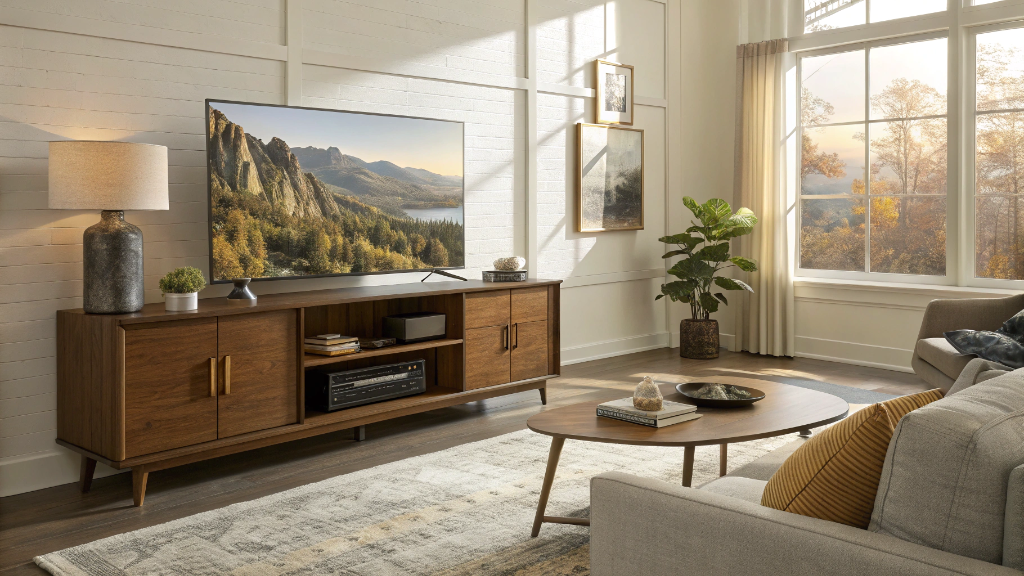
The first thing anyone sees walking in is the TV wall. Might as well own that. A real media console makes the wall look intentional. Lamp on one end. Plant on the other. That's the whole trick.
How to Choose the Right Size TV Stand

Skip this part, and you'll end up returning the stand a week later. Done that myself. Four checks before clicking buy.
Measure the Actual TV Width
TVs get measured diagonally. Corner to corner. Which is misleading. A 65-inch screen is about 57 inches across. A 75-inch sits around 65. A 100-inch is roughly 88 wide. The spec sheet has the real number. Look it up before you order.
Pick a Stand Wider Than the TV
Standard advice everyone learns the hard way. The stand should be 4 to 6 inches wider than the TV overall — that's a minimum of 2 to 3 inches of clearance on each side. Not just aesthetics. Safety. A TV that hangs past the edges of its stand is a genuine tip hazard. Ask any parent of a toddler.
Check the TV Base or Feet Width
Where most people get burned, big modern TVs often have feet set near the corners of the screen, sometimes 60 inches apart on a 75-inch model. Is the stand narrower than the foot distance? The back legs hang off the edge. The whole thing wobbles. Measure foot to foot before shopping.
Match the Stand to the Wall
A 90-inch console crammed against a 10-foot wall looks crowded. A 60-inch stand on a 16-foot wall looks lost. Rough rule, the stand fills 60 to 70 percent of the wall it's on. Painter's tape is free; mark the size on the wall before you buy.
TV Stand Width Chart for Large TVs
Save this for shopping:
|
TV Size |
Actual TV Width |
Recommended Stand Width |
Best For |
|
55” |
~48 inches |
54–62 inches |
Apartments, small living rooms |
|
65” |
~57 inches |
63–70 inches |
Standard living rooms |
|
75” |
~65 inches |
72–85 inches |
Larger rooms, family setups |
|
85” |
~74 inches |
80–90 inches |
Open-concept spaces |
|
100” |
~88 inches |
94–120 inches |
Home theaters, great rooms |
TV widths vary by brand. Always cross-check your specific model.
TV Stand for a 65-Inch TV

The 65-inch TV is the most-purchased TV size in America right now. Makes sense. Fits in most living rooms without dominating the room. The actual screen is about 57 inches wide, so a stand 63 to 70 inches across works best. Beyond that, the TV starts to look small on top. Smaller, the whole thing feels cramped.
For a 65-inch, I recommend mixed storage. Two closed cabinets for the random stuff you don't want to see. One or two open shelves for the gaming console and cable box that need to breathe. The Prelude 65-inch media console was built around exactly this idea. Cabinet doors hide streaming boxes. Open the middle section handles soundbars or routers that get warm during long binge sessions.
TV Stand for a 75-Inch TV

75-inch is where the rules get stricter. The screen's about 65 inches wide, which means a typical 60-inch stand looks like a toddler table underneath. Go 72 to 85 inches for the stand. Anything less feels off. Past 90 starts being out of scale.
Storage matters more at this size, too. Bigger TVs come with more gear. PS5 Pro, maybe. An AV receiver. Apple TV. Router. Soundbar. Probably a sub. Pick a deeper stand, 16 to 20 inches front-to-back, so the devices fit without crowding each other. The Helio 75-inch TV stand is sized specifically for this ratio. Cabinet doors for hiding gear. Flat top that fits a soundbar without forcing the TV up to a weird height.
TV Stand for a 100-Inch TV

At 100 inches, you stopped buying a TV. You're building a home theater. The screen's around 88 inches across. The stand needs to clear at least 94 inches. Anything narrower, the TV swallows the furniture. Most 100-inch setups land between 96 and 120 inches wide—usually modular pieces or two-piece designs.
Weight becomes a real factor here. A 100-inch TV runs 100 pounds. Some hit 150. That whole load goes through the stand, plus all the AV gear sitting on shelves. Want reinforced tops. A center support leg. A weight rating that's well over your full stack. The Stria up-to-100-inch TV console is engineered for this load class. Wide cabinet base. Storage sized for a full home theater rack.
Storage Features to Look For

Not all storage is equal. Some stands look amazing in product photos and turn out to be useless the second you actually try to use them—four things to check before buying any large TV stand with storage.
Closed Cabinets
For the stuff you don't want to see. Random HDMI cables. Old DVDs nobody watches anymore. The universal remote you never programmed. Adjustable interior shelves help you store a tall router or a short stack of board games. Soft-close hinges sound boring. They make every day better.
Open Shelving for Gaming Consoles
Non-negotiable if anyone in the house plays games. PS5 pumps out real heat. Same with Xbox Series X. Trap it either in a sealed cabinet without ventilation, and you'll hear the fans within an hour—eventually, thermal throttling. Open shelves let air move. Better stands have rear cable cutouts on each shelf, so wires run out the back rather than dangle in the front.
Drawers
Most underrated TV stand feature. By a lot. Where remotes actually live. Where controllers go between sessions. Where are you storing charging cables when the company shows up? Two or three center drawers handle real-life chaos in a way open shelves never can.
Cable Management
Look for rear cable cutouts, removable back panels, or open-back designs. Without these, you'll be crawling behind the TV every time you plug something in. Internal cable channels are a nice bonus; they let you route wires from one side of the stand to the other when your power strip ends up on the wrong end.
Best Large TV Stand Styles

Function first. Style still matters, though, the stand sits dead center in the room. The wrong silhouette throws off the whole space. The Helio media console lineup covers most of what's below.
Modern Design
Clean lines, neutral finishes, low profile, almost no hardware. Works in just about any room. If you can't decide what direction your space leans, start here. Safest pick.
Mid-Century Modern
Tapered legs, walnut or oak finishes, the whole 1960s revival look. Pairs really well with a leather sofa and a couple of plants. Probably the most-bought style of the last three years for a reason.
Farmhouse
Sliding barn doors, distressed wood, black metal hardware. Warmer feel, more texture. Works great in homes that already lean rustic. Drop it into a sleek, modern apartment,t and it'll fight every other piece in the room.
Floating Wall-Mounted
Mounts directly to the wall, no legs at all. Looks really clean and makes a small room feel bigger. Catch is installation has to hit studs (regular drywall anchors won't hold a loaded media console). And weight ratings tend to be stricter than floor units.
Height, Viewing Distance, and Comfort

Where most TV setups quietly go wrong. The center of the screen should sit at or just below your seated eye level. For an average couch, that's about 42 inches from the floor. Bigger TV, lower stand. Simple rule, most people miss it.
Number-wise, 26 to 32 inches works for most 65- and 75-inch screens, which aligns with the standard TV stand height range covered in our earlier guide. For very large setups — especially a 100-inch screen — that range drops to 18 to 24 inches. The reason is simple: bigger TVs are much taller, so a lower stand keeps the center of the screen at a comfortable eye level when you're seated. Without that adjustment, a 100-inch on a normal-height stand sits too high, and you'd be looking up at it the whole time.
Safety Tips for Large TV Setups

Big TVs tip. The CPSC tracks injuries and deaths from furniture and TV tip-overs every year, and the numbers aren't small. AnchorIt.gov, the federal safety campaign, says anchor every TV and every piece of large furniture to the wall. The kit costs less than a Starbucks run. Ten minutes to install. No good reason to skip this.
Match the Stand to TV Weight
Check the top-surface weight rating before buying. A 75-inch TV runs 60 to 80 pounds. A 100-inch can hit 150. Add a soundbar, and you're past what most cheap stands can safely handle.
Avoid TV Overhang
Is the TV wider than the stand? You've made a leverage problem. One bump from a kid or a vacuum and it goes. Always wider on the stand. No exceptions.
Anchor the Stand and the TV
Two anchor points. Stand against the wall. TV to wall (or TV to stand). Kit usually includes both straps. Use both.
Common Mistakes to Avoid

Buying Based on the Diagonal Number
A 65-inch TV is not 65 inches wide. Neither is a 75 or a 100. Diagonal numbers are misleading for stand sizing — they describe the screen corner to corner, not edge to edge. Always use the actual screen width when you're shopping for a stand.
Skipping the Depth Check
Stand only 14 inches deep? A modern TV with wide-set feet won't sit properly on it; the back legs hang off. Go 16 inches minimum, more if a soundbar is going on top of the stand.
Choosing Style Over Storage
That gorgeous console with three tiny drawers won't fix your actual cable nightmare. Be honest about how much gear you own. PS5, Switch, Apple TV, router, modem, soundbar, sub. Pick a stand that fits the whole stack.
Ignoring Ventilation
Sealing a PS5 in a closed cabinet without airflow shortens its life. Always leave one open or vented shelf for hot components.
Forgetting Future Devices
You'll add stuff. Always. New gaming console next year. A second streamer. A bigger soundbar. Leave one shelf empty.
The Bottom Line
Look, the best large TV stand with storage isn't the prettiest piece in the showroom. The one that actually works is wider than your real TV (not the diagonal label on the box, the real width across the front), deep enough to hold a soundbar plus your console stack, low enough that your eye lands on the middle of the screen when you sit down, and put together with cable management that doesn't force you to crawl behind the unit every other week. Storage should fit how you actually live. Anchor straps go on the back of every single piece. That's pretty much the whole thing.
Want the cheat sheet version? A 65-inch TV is happiest on a stand somewhere between 63 and 70 inches wide. Bump that to 72-85 for a 75-inch. And if you went big with a 100-inch, you're looking at a minimum of 94 inches, ideally with reinforced build quality so the unit doesn't sag in five years. Once the dimensions are sorted, the style choice becomes much easier.
FAQs
How much bigger should your TV stand be than your TV?
Few inches wider on each side, basically. The technical guideline specifies 2 to 6 inches wider than the TV's actual width, with at least 2 to 3 inches of clearance per side. This is more about safety than how it looks. A TV hanging over the edge of a stand is the kind of thing that ends with broken glass and a vet bill if a kid or dog bumps into it. Specifics: a 65-inch TV (around 57 inches across) wants a stand 63 to 70 inches wide. 75-inch (about 65 across) needs 72 to 85. A 100-inch needs at least 94.
Is a 70-inch TV stand too big for a 65-inch TV?
No, that's actually the goldilocks fit. Your TV's about 57 inches across, so the 70 gives you roughly 6 inches per side. Plenty of breathing room. Looks balanced. Wouldn't think twice about it.
Is a 60-inch TV stand big enough for a 65-inch TV?
Physically, it'll fit. But here's what'll bother you. The TV's around 57 inches wide,e and the stand is 60, so you've got barely an inch and a half of overhang protection per side. Not enough buffer if anything bumps the stand, and visually, the TV ends up looking too big for the furniture. You'll notice it every time you walk into the room. If there's any flex in the budget, bump up to 63 or 70 inches.
How do I choose the right size TV stand?
Three checks in this order. First, measure the actual TV width, not the diagonal number from the spec sheet. Second, add at least 4 inches to that for safe clearance. Third, make sure the stand is wider than the gap between your TV's feet — this last one catches more buyers than the diagonal-vs-width thing. After that, factor in the wall (the stand should fill about 60 to 70 percent of it), how much gear you need to store, and the height (screen center near seated eye level, which lands around 42 inches off the floor for most couches).
Can you put a 75-inch TV on a 65-inch stand?
Don't. Your TV's roughly 65 inches wide, and so's the stand, meaning zero overhang protection and a real tip risk if anything bumps the stand. It'll look unbalanced too. For a 75-inch TV, you want at least 70 inches of stand height, ideally 72 to 85 inches if your wall has room.
Is it worth going from a 65 to a 75-inch TV?
Suppose your room can take it, yeah. Solid jump. Screen area goes up about 33 percent, which feels much bigger in person than the inches suggest—two things to verify before pulling the trigger, though. You'll want 9 to 12 feet of viewing distance (any closer and it feels like the front row of a movie theater), and a stand at least 72 inches wide. Both check out; the difference in movies and games is noticeable.
How long should a TV stand be for a 75-inch TV?
The floor is 72 inches. The range that looks best sits between 75 and 85. Anything in the 72-80 range works for a standard living room. Going 80 to 85 gives breathing room for a soundbar or a table lamp on either side, and it just looks more intentional.
Will a 75-inch TV fit on a 72-inch TV stand?
In most cases, yeah. A 75-inch is generally 65 to 67 inches wide, so a 72-inch stand leaves about 2 to 3 inches of clearance per side. That's the bare minimum I'd recommend. The thing to verify before clicking buy is the foot placement on your specific TV. Some 75-inch models have feet set very close to the edges of the screen, and if the foot-to-foot distance exceeds 72 inches, the legs won't sit flat on the stand.
Sources
- HGTV — Functional and Chic Media Storage Ideas
- AnchorIt.gov (U.S. Consumer Product Safety Commission) — Furniture and TV Tip-Over Prevention
- RTINGS — TV Size to Distance Calculator (and the Science Behind It)
- CPSC News — Anchor It! Campaign Marks 10 Years
- Consumer Reports — Best Furniture Anchor Kits to Prevent Tip-Overs
- HGTV — Entertainment Center Ideas for Living Rooms
- CPSC — Furniture and TV Tip-Over Safety Information Center


Stay In The Know
Expert advice. Very good deals. The absolute best (and worst) things we've tested lately.
Looking for something else?

Best Vase for Tulips: A Florist's Honest Guide to Shape, Height, and Styling
LEARN MORE
41 Small Outdoor Living Spaces Ideas to Transform Even the Tiniest Patio
LEARN MORE
Modern Sideboard for Living Room: Complete Buying & Styling Guide
LEARN MORE
17 Camel Leather Sofa Decorating Ideas to Transform Your Living Room
LEARN MORERead more from Blogs
Looking for something else?
36 Wall Art Ideas That Make Any Room Feel Finished
LEARN MORE
What is an Ottoman? 8 Reasons Why You Need One
LEARN MORE
How to Sit in Bed With Good Posture: 10 Simple Tips
LEARN MORERead more from Blogs
You may also like


Further reading

What Is a Platform Bed? A Simple Guide to Types, Benefits, and Buying

Bed Sizes Guide: Dimensions From Twin to King