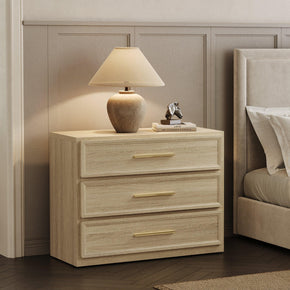





Nightstand With Charging Station and USB Port: Complete Buying Guide
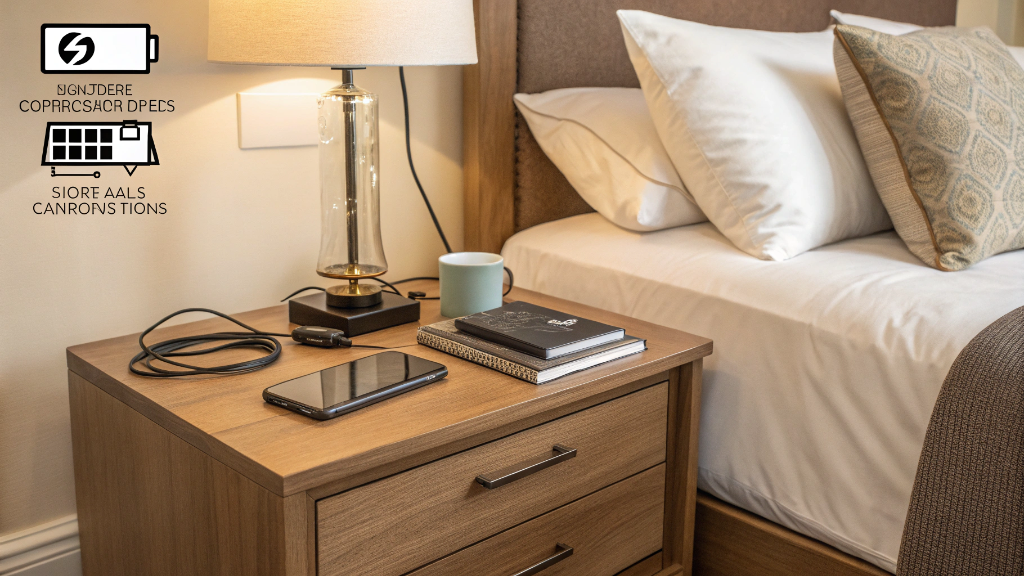
Look at the side of your bed. A lamp, a phone, maybe a tablet or smartwatch — and under all of it, a knot of cables you stopped seeing months ago. That's the problem a nightstand with a charging station is built to fix. It's a normal bedside table with built-in power, so cords stop sprawling across the floor and your devices have somewhere to live. This guide covers what these tables are, the port types worth knowing, whether they're safe, and how to pick one that fits your room and not just your gadgets.
What is a nightstand with a charging station?

Strip it down, and a nightstand with a charging station is just a bedside table with built-in power. Same drawers, same shelf, same surface for your lamp — but somewhere on the piece sits a recessed strip of outlets and USB ports, wired to a single cord that runs to the wall.
What you charge off it is up to you — phone, tablet, smartwatch, earbuds, a reading light, the lamp itself, all from one built-in hub. Where the ports sit varies: some designs put them on the tabletop, some on the back panel, some tuck them inside a drawer or behind a baffle. The payoff is the same across all of them. Your bedside essentials stay powered and organized.
Why Choose a Nightstand With USB Port or Built-In Outlet?

Fair question — do you actually need one, or is it a gimmick? Here's the honest case: in the four reasons that come up most.
Easier Bedside Charging
No more groping behind the headboard for an outlet you can't see, or running a phone cable across the table to a socket three feet away. A nightstand with a USB port puts the power where your hand already goes. Plug in, done.
Less Cable Clutter
This is the one most people actually buy it for. Cord cutouts, rear openings, a hidden power strip routed behind the piece — the cables stop spilling onto the floor and start staying put. The surface looks calmer, and so does the whole corner.
Better Storage and Organization
It's still a nightstand, so it still earns its keep. Drawers swallow the chargers, spare cables, reading glasses, and the half-finished book. An open shelf handles what you want in reach. Power and storage in one footprint — that's the combination doing the work.
Useful for Small Bedrooms

When floor space is tight, every piece has to pull double duty. A charging nightstand does — it's a bedside table and a charging hub in one square foot of space, instead of a table plus a power strip plus an extension cord. For a snug room, the compact nightstand with outlet and USB access is the kind of footprint that fits without crowding the walkway.
Common Charging Features to Compare

Before you shop, it helps to know what the charging spec sheet means. Here's the plain-English version of the five features you'll run into.
AC Outlets
Standard wall-style sockets are built into the table. These are for anything that doesn't run off USB — a lamp, an alarm clock, a sound machine, or just your own phone adapter. Most charging nightstands include one or two.
USB-A Ports
The older, flat rectangular USB port. Plenty of charging nightstands still use these, and they work fine — but they're usually slower than newer options. If most of your cables still end in USB-A, no problem. Just know it isn't fast charging.
USB-C Ports
The newer, smaller, reversible port — the one most current phones and tablets actually use. A nightstand with USB-C is the more future-friendly pick. If you bought a phone in the last couple of years, this is the port you'll reach for.
Wireless Charging Pads
Some tables build a charging pad into the top panel — set the phone down; it charges, no cable required. It looks clean. The catch: placement matters, and it's usually slower than plugging in. Nice to have, not a dealbreaker either way.
Hidden Charging Compartments
A drawer or baffle with the ports tucked inside, so devices charge out of sight while you sleep. Good if you'd rather not see a glowing screen all night. It means a bit more attention to cord routing, but the tidiness is the trade.
Are Charging Nightstands Safe?

Short answer: yes, when the piece is built with decent electrical components,s and you don't abuse it. The charging itself isn't the scary part. Apple notes that an iPad stops charging once fully charged, so leaving a phone plugged in overnight won't overcharge it. Heat is the thing actually to mind — batteries warm as they charge, and Apple's Optimized Battery Charging exists partly to manage that. A few sensible habits cover most of it.
Pick a nightstand with certified electrical parts — look for UL, ETL, or a similar safety listing. Don't overload the outlets. Charge devices on a hard, flat surface, not buried under a pillow where heat builds up. Keep cords clear of sharp drawer edges that could pinch through them over time.
If you're adding your own power strip, UL recommends choosing a properly certified strip or surge protector rather than the cheapest one on the shelf. And the U.S. Consumer Product Safety Commission points out that extension cords missing basic safety characteristics — proper wire size, strain relief, and polarization — pose a risk of electrical shock and fire. The furniture isn't the hazard. Cutting corners on the wiring i.
How to Choose the Best Nightstand With Charging Station

This is the part that decides whether you're happy with the thing a year from now. Run through these six checks before you buy — they cover the charging side and whether the table works as furniture.
Check the Number of Ports
Count what you charge on a normal night: a phone, tablet, watch, earbuds, a lamp, and a partner's phone if you share the table. Add it up honestly, then make sure the nightstand has enough outlets and ports to cover it. Running short by one is annoying every single night.
Choose USB-C If You Use Newer Devices
If your phone and tablet charge over USB-C, buy a tabletthat charges over USB-C.That's simple. USB-A still works for older gear, but don't buy furniture today that's already a generation behind the cables in your hand.
Look at Port Placement
Top-mounted ports are easiest to reach but most visible. Back-panel ports look cleaner but mean fishing a hand around behind the table. Drawer ports hide everything, but need decent cord routing. None is wrong — just pick the trade-off you'll be happy with at 11 pm.
Measure Nightstand Height and Width

The cleverest charging setup is useless if the table is the wrong size for the bed. Aim for a nightstand top within a couple of inches of your mattress height, and a width that suits the room rather than swamping it. Browse a full range of nightstands and filter by dimensions before you fall for a look — fit first, style second.
Consider Storage Layout
Drawers hide clutter; open shelves keep books and baskets in reach; a mix suits most bedrooms. Think about what currently lives on and around your bedside table, then pick a layout that gives it all a home. One good drawer beats a prettier table with nowhere to put anything.
Review Cable Management
This detail separates a tidy nightstand from a frustrating one. Look for rear cord cutouts, a recessed outlet bay, a raised back, or a routed channel for the main power cord. Those features are specific to this category — you'll notice their absence the first time the table won't sit flush to the wall.
Nightstand With Charging Station vs Regular Nightstand

Not everyone needs the charging version, so let's be straight about when it's worth it. A charging nightstand wins if you power several devices a night, hate visible cords, or want that plug-it-in-and-forget-it convenience. A regular nightstand is genuinely fine if you've already got easy access to outlets behind the bed, or if you simply prefer your own chargers.
The honest trade-offs: a charging nightstand costs a bit more, and built-in ports can date as connector standards shift. A plain nightstand can always be upgraded later with a charging tray, a tucked-away power strip, or a cable organizer. If you're on the fence, look at the wood nightstand with a built-in charging station against a standard table — the price gap is often smaller than people expect.
Can You Add a Charging Station to an Existing Nightstand?

Yes — and you don't have to be especially handy. There are a few routes, from no-tools-needed to a light DIY project. Lifehacker has a solid walkthrough on how to do it properly. Just keep electrical safety in mind whichever way you go.
Add a Charging Tray

The renter-friendly option. A charging tray or small dock just sits on top of the nightstand — no drilling, nothing you can't undo when you move. Cheapest and easiest way in.
Use a Cord Organizer or Cable Clips
A few dollars of cable clips and a cord sleeve tame the worst of the mess behind the table. It doesn't add charging, but it solves the clutter half of the problem, which is what most people are really bothered by.
Turn a Drawer Into a Charging Station
The light DIY route: drill a cord-sized hole in the back of the drawer and the nightstand, route a power strip or charging hub inside, then use small bins to separate each device. A genuine afternoon project — but it turns any nightstand you already own into a hidden charging station.
Use Certified Electrical Parts
Whatever route you pick, don't cheap out on the electrical bits: a certified power strip, an undamaged cord, and no overloading. A charging drawer is only as safe as the parts inside it, and this is not the place to save five dollars.
Best Places to Use a Nightstand With a Charging Station

It's easy to think of this as a primary-bedroom piece, but the charging access makes it a fit for far more rooms. The main bedroom is obvious. So is the guest bedroom — visitors especially appreciate not having to hunt for an outlet in an unfamiliar room.
Beyond those: a teen's room, a dorm setup, a small apartment where furniture has to multitask, a nursery beside the glider, the daybed corner of a home office, or a short-term rental where you want guests to be comfortable fast. The charging stays useful everywhere; the drawer storage just adapts to whatever the room needs.
Design Tips for a Cleaner Bedside Setup

A charging nightstand handles the function. These touches handle how the corner looks and feels.
Keep the Top Surface Simple
A lamp, your phone, a book, a glass of water — that's a full, working nightstand top. Anything past it crowds the charging area and undoes the tidiness you bought the table for. Restraint reads as calm.
Hide Extra Cables
Even with built-in power, a stray cable or two usually escapes. Cord clips, a cable sleeve, the rear cutout, or just stashing the slack in a drawer — any of them keeps the back of the table from becoming the new mess.
Match the Finish to Your Bedroom
Warm wood tones suit a cozy or traditional room. Black or white finishes lean modern. Rattan or cane detailing fits a boho or coastal space. The charging function is invisible — so let the finish do the talking and match it to the room.
Use Two Matching Nightstands for Symmetry

For a queen or king bed, a pair flanking the headboard looks more finished than one lonely table — and both sleepers get their own lamp, surface, and ports. Browsing matching nightstand sets of two is the quickest way to get that balanced, hotel-tidy look on both sides at once.
Common Mistakes to Avoid

Most regret with these tables traces back to the same handful of slip-ups. Buying without checking the port type — then finding it's USB-A only when all your cables are USB-C and forgetting to check where the cords exit the piece—pushing the nightstand tightly against the wall so the plugs bend and strain.
A few more: overloading the built-in outlets, ignoring the table's height until it's beside the bed looking wrong, choosing so little storage that the clutter just moves from the floor to a drawer you don't have, assuming a wireless pad will fast-charge (it usually won't), and picking a model where the lamp ends up sitting right on the flip-up charging lid. Small things — but each one nags every day.
FAQs

Is it okay to just have one nightstand?
Yes, completely. One nightstand works fine in a small bedroom, a guest room, or when the bed sits against a wall. Two tables usually look more balanced for a queen or king bed — that's symmetry, not a rule. If space or budget says one, one is fine, and a single charging nightstand on the side you actually use can be the more practical call anyway.
Are charging nightstands safe?
Yes, as long as the piece uses quality electrical components, the outlets aren't overloaded, and there's a little air around charging devices. Look for a UL or ETL safety listing when available, and avoid cheap, damaged, or loose-feeling outlets. The charging hardware in a well-made nightstand is no riskier than a wall outlet — corner-cutting and overloading create problems, not the concept itself.
Can I add a charging station to my nightstand?
You can. The easy routes need no tools — a charging tray that sits on top, a wireless pad, or cable clips to tidy the cords. For a built-in feel, route a power strip into a drawer through a drilled cord hole. Whichever way you go, use certified electrical parts and skip any sketchy DIY wiring — the convenience isn't worth a safety shortcut.
Is it safe to charge your phone on your bedside table?
Yes — and a hard bedside table is one of the better places to do it. A firm, open surface lets heat escape, which is far safer than charging under a pillow or buried in bedding. Keep the phone uncovered, use a quality cable and adapter, and you're doing it right. A nightstand with a charging station just makes that the default setup.
Is it bad feng shui to only have one bedside table?
In feng shui, a matched pair is generally preferred — the symmetry reads as balance and as equal space for both partners. That said, one table isn't a disaster. If the room is limited, a single nightstand that keeps the space calm and uncluttered still works. Feng shui leans on balance and overall good flow, not on rigidly owning two of everything.
What is the difference between a bedside table and a nightstand?
In everyday use, almost nothing — people swap the terms freely. The fine distinction: a nightstand usually implies drawers or shelves and a storage role, while a bedside table can be simpler, sometimes just a surface. For a charging piece, it barely matters, since you're buying it for storage and power either way.
What is the rule for bedside tables?
The working rule of thumb: a bedside table should sit close to mattress height — within a couple of inches — be easy to reach from where you lie, stay roughly proportional to the bed, and store your nightly essentials. Get those four right and the table does its job. Charging features sit on top of that; they don't replace it.
What to put instead of a nightstand?
Plenty works — a small dresser for more storage, a floating wall shelf to save floor space, a stool or side table for a minimal look, even a sturdy stack of large books in a pinch. The catch with most of these is power: they won't charge anything on their own, so you'd be back to a tray or a wall outlet. That's the quiet advantage a charging nightstand keeps.
Final Takeaway: Is a Nightstand With Charging Station Worth It?
Here's the bottom line. A nightstand with a charging station isn't really a tech gadget — it's a storage, organization, and convenience upgrade that happens to have built-in power. If you charge more than one device a night, if visible cords genuinely bug you, or if you just want a calmer, plug-it-in-and-forget-it bedside routine, it earns its place. The best one for you has the right port types for your devices, a safe, certified build, storage that suits what you keep beside the bed, and a finish that fits the room. Line those fo, ur up and it's an easy yes.
Sources
- Apple Support, official iPhone battery guidance, Apple Support — Charge and Maintain Your iPhone Battery
- Apple Support, official iPhone charging documentation, Apple Support — Charge Limit and Optimized Battery Charging
- U.S. Consumer Product Safety Commission, federal consumer safety agency, U.S. CPSC — Extension Cords FAQ and Safety Characteristics
- UL Solutions, an independent global safety certification body, UL Solutions — Product Safety Standards and Certification
- Docking Drawer, in-drawer power and charging hardware manufacturer, Docking Drawer — Bedroom Charging Drawers (ETL-Listed Outlets)
- Walmart, national retailer category reference, Walmart — Nightstand With Charging Station Category
- Lifehacker, consumer technology and DIY publication, Lifehacker — Turn Your Nightstand Into a Charging Station the Right Way


Stay In The Know
Expert advice. Very good deals. The absolute best (and worst) things we've tested lately.
Looking for something else?

36 Wall Art Ideas That Make Any Room Feel Finished
LEARN MORE
What is an Ottoman? 8 Reasons Why You Need One
LEARN MORE
How to Sit in Bed With Good Posture: 10 Simple Tips
LEARN MORE
Nightstand Height for a Queen Bed: The Complete Size Guide
LEARN MORERead more from Blogs
Looking for something else?
Nightstand With Charging Station and USB Port: Complete Buying Guide
LEARN MORE
27 Boho Bedroom Ideas for a Cozy, Soulful Space
LEARN MORE
Nightstand Set of 2: How to Choose the Right Pair for Your Bedroom
LEARN MORERead more from Blogs
You may also like


Further reading

What Colors Go With a Black Sofa? 21 Stylish Living Room Ideas

26 Beige Sofa Living Room Ideas for a Warm, Stylish Home