

























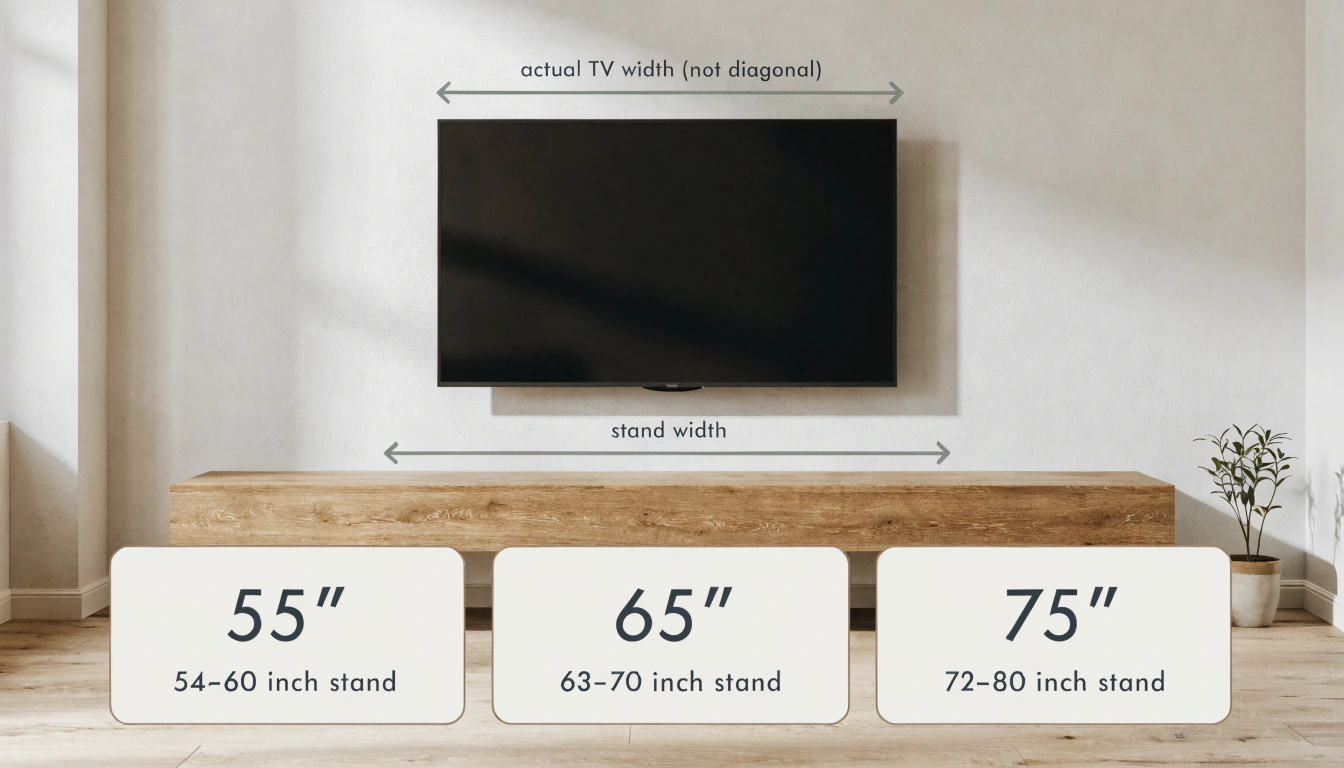

How Big Should Your TV Stand Be for a 55, 65, or 75 Inch TV?
Your quick-glance 55, 65, 75-inch TV stand size chart: real screen width, matching stand width, and the right height, all in one place. Wondering about TV stand sizes for 55-, 65-, and 75-inch TVs? Most folks fixate on the number stamped on the box. Skip that. Match the stand to the real screen width instead. Roughly speaking, a 55-inch TV spans 48 inches, a 65-inch about 57, a 75-inch near 66. Run that out, and the stand sizes you want are 54-60, 63-70, and 72-80 inches. Width is just the opening move. Height, depth, and weight capacity matter just as much, and getting one wrong can throw the whole setup off. I learned that the hard way, which I will get to. (See theCPSC Anchor It tip-over guidance before you buy.)
|
Quick answer: Match the stand to your TV's real width, not the diagonal. Tack on 6 to 12 inches overall. Every range in the chart below follows the same TV width-plus-6-to-12-inches rule, so the numbers stay consistent throughout the guide. That puts you at 54-60 inches for a 55-inch TV, 63-70 inches for a 65-inch TV, and 72-80 inches for a 75-inch TV. |
Why You Size by Actual TV Width, Not the Diagonal

The number on the box is the diagonal. It runs corner to corner across the screen. That tells you nothing about how wide the TV actually sits on a surface, and the surface is what your stand has to cover.
Width is what counts. Nothing else on the spec sheet changes the footprint your stand has to cover. Now the part people miss: a flat screen stretches wider than it stands tall, so that diagonal figure quietly overstates the real width every time. Grab the true width off the spec sheet, or just run a tape measure across it. Then leave a few inches of breathing room on each side.
My rule of thumb: at least 3 inches of stand showing on each side of the TV. Six total, minimum. Want it to read more grounded and intentional? Push that to 6 inches per side. The extra width looks premium and gives you space to style with a plant or a stack of books. If you want the full reasoning, Room&Boards breaks down the spacing logic without the fluff.
TV Stand Size Chart for 55, 65, and 75 Inch TVs

Below is the at-a-glance version of what size TV stand for a 55, 65, or 75 inch TV. Real screen width first. Then the stand width that fits it. Then the height range that keeps the screen near eye level.
|
TV Size |
Actual TV Width |
Recommended Stand Width |
Stand Height |
Best For |
|
55” |
~48 inches |
54–60 inches |
24–28 in |
Apartments, small rooms |
|
65” |
~57 inches |
63–70 inches |
22–26 in |
Standard living rooms |
|
75” |
~66 inches |
72–80 inches |
20–24 in |
Larger family rooms |
One safety rule cuts through all of it: never go narrower than the TV's real width. The stand should match that number or beat it, so the screen sits fully supported with nothing hanging past the edges where it can tip or strain the panel.
See how the height range shrinks as the TV grows? Most charts miss that and slap one flat height on every size. A taller screen has to sit lower. Park it too high and your eyes keep drifting to the bottom third of the picture instead of the center where they should be.
What Size TV Stand for a 55 Inch TV

Across the front, a 55-inch TV runs close to 48 inches. The chart above shows the stand width that pairs with it. You want enough overhang on each side for a balanced look, with the stand remaining proportional to the room rather than dominating it.
What size stand for a 55-inch TV, then? Look for 48 inches wide at the very least. The sweet spot is 50 to 58. That keeps the screen centered with the same bit of overhang on each side. And for an apartment or a smaller living room, it just fits. The thing people forget is height. Land somewhere between 24 and 28 inches, and the screen center hits eye level the second you drop onto the couch. A few inches off and you spend the whole film craning your neck.
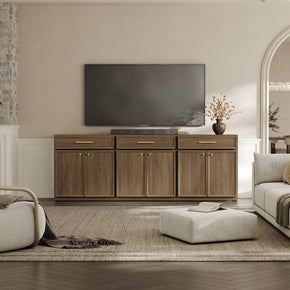
Setting up a 55-inch screen? The Terra media console at 55 inches wide runs almost flush with it. A soundbar still tucks in with a little room to spare.
Can a 55-inch stand fit a 65-inch TV?
You can force it. A 65-inch TV measures about 57 inches across, and a 60-inch stand supports that weight without complaint. The overhang on each side ends up tiny, though. The result looks cramped, and it feels less stable than it should. Skip it.
What Size TV Stand for a 65 Inch TV

A 65-inch TV? The figure is about 57 inches across the front. Match that to the stand width in the chart, and you're left with maybe 3 to 6 inches poking out on each side. That reads cleanly and keeps the TV looking planted rather than perched.
What size TV stand for a 65-inch TV really comes down to width. Go at least 57 inches. Sit it in the 60 to 70 range and each side gets that clean 3 to 6 inches of breathing space. Time for the confession. My first apartment TV was a 65, and I grabbed a 60-inch stand because it was marked down. The screen hung over both edges like a diving board. It nagged at me every single day until I caved and swapped it. Learn from my cheapness.
If you want flexibility, a Stria modular stand that supports screens up to 85 inches handles a 65-inch screen now and a larger one later.
RTINGS has solid notes on viewing distance for this size if you are still deciding. Their distance calculator is worth a look.
Is a 65-inch TV overkill?
It depends on where it's going and how close you sit. Most living rooms swallow a 65 just fine — it looks right, not cramped, not lost on the wall. But I've seen one shoved into a small bedroom, bed maybe four feet from the screen, and it was too much. You sit that close to something that big, and your eyes don't know where to land.
What Size TV Stand for a 75 Inch TV

Out front, a 75-inch TV measures close to 66 inches. Check the chart for the matching stand width: big screen, big base. Go too narrow and the whole setup looks top-heavy, and you give up stability right where it matters most.
What size TV stand for a 75-inch TV? Plan on 66 inches wide at a minimum. The sweet spot is 70 to 80, which is what makes a screen this big look planted and stay steady. Height drops again at this size. Settle on something around 20 to 24 inches. That keeps the picture centered near eye level once you settle back into your seat. Go any taller and a 75-inch screen creeps up into neck-strain territory.
Something like the Helio cabinet built for a 75-inch TV hits both marks. It brings the width a screen this size needs and the weight rating to hold it steady.
Can I put a 75-inch TV on a 55-inch stand?
No. Sitting at 66 inches across, a 75-inch TV hangs past a 55-inch stand by about half a foot on each end. That is unsafe and looks wrong. Match the width.
Will a 75 TV fit on a 65 TV stand?
Barely, and not well. Set a 75-inch TV on a 65-inch stand and the ends still hang past the edges. Move up to the size in the chart so the base sits under the whole screen.
How long should my TV stand be for a 75-inch TV?
You want it past 66 inches so the screen clears with breathing room. Check the chart for the exact range. And keep a few inches free on either end, enough to set down speakers or a small piece of decor.
Beyond Width: Height, Depth, and Weight Capacity

Width gets all the attention. The other three numbers are where setups quietly fall apart.
- Height: aim for the screen center near eye level from the couch. That usually means a stand 20 to 28 inches off the floor, with the height dropping toward the lower end as the TV gets bigger.
- Depth: Go 16 inches or more. A shallow stand wobbles; a deep one just sits there, solid. And you want enough surface that a soundbar isn't hanging half off the front edge.
- Weight capacity: Don't skip this one. Bolt the base onto a 75-inch TV, and you're often looking at 70-plus pounds, sometimes a good bit more. So check the stand's rating. It needs headroom over your TV's weight, not a dead-even match.
- Cable management: look for back cutouts or channels. Hidden cables make any size TV look twice as expensive.
One safety note worth repeating: anchor the TV or the stand if you have kids or pets. KreateCube covers anti-tip basics in a quick read.
What If You Wall-Mount the TV?

Even with a wall-mounted TV, stand size still matters. Mounting changes the math a little, not entirely. You no longer need the stand to support the screen, so the width can shrink to match your storage needs and the wall, not the TV. Plenty of people still center a console below for a polished, finished look, which gives you a spot for the soundbar and streaming boxes. ASavanna TV console with storage works well in that spot.
If you are mounting, get the height right. Vogel's has a simple guide. Their advice on mounting heighthelps you place the screen so it sits at eye level when seated.
Where the Stand Lives in Your Room

A stand never lives on its own. It has to play nicely with everything around it. Browse the fullTV stands and media consoles for living rooms to see how widths pair with seating and side pieces.
For lower-profile options that double as storage, narrow console tables for mounted TVs suit small rooms or setups where the screen is on the wall.
Final Takeaway

Trust the TV's real width over the diagonal on the box. The chart up top pairs each screen, 55, 65, or 75-inch, with the stand size that fits. After that, run through height, depth, and weight capacity before you buy. Get those four right and the room comes together. Get the width wrong, and it will bug you every single day. Speaking from experience, there.Before you settle on a TV stand from theTV stand collection, measure your set's actual width and check it against the chart at the top to ensure the fit is right the first time.
FAQs
What size TV stand do I need for a 55-inch TV?
Match it to the chart. The screen sits about 48 inches wide, so the right stand gives you balanced overhang on both sides, plus a little space to style. Run down this quick list:
- Width: 54 to 60 inches, leaving roughly 3 inches of stand on each side.
- Height: 24 to 28 inches, so the screen center lands near eye level.
- Depth: 16 inches or more, enough for a soundbar to rest on and a base that does not wobble.
Is there a big difference between a 55 and a 65-inch TV?
Definitely, step up to a 65-inch TV for a bigger picture and greater presence in the room. The width increases with it, from about 48 inches to 57 inches, so a wider stand is often part of the deal.
Is there a big difference between a 55 and a 75-inch TV?
Big jump, yes. The 75-inch pulls you further into whatever you are watching, but it takes up more space. A couple of things need to fall into place:
- A larger room with enough wall width for the screen.
- A stand wide enough to support the 66-inch screen, per the size chart.
- The seatingis set back far enough, usually 9 to 12 feet, so the picture feels easy on the eyes.
Is it worth upgrading from a 55-inch to a 65-inch TV?
For many living rooms, yes. Sit roughly 7 to 9 feet back or further, and the 65-inch pulls you in more without tiring your eyes. Park yourself closer than that, though, and the extra size can start to feel like too much.
Is a 65-inch TV overkill?
It depends on room size and viewing distance. In a living room, a 65-inch TV usually feels natural and easy to live with. In a small bedroom or a spot with close seating, though, it can feel too large for the space.
Sources
- Consumer Product Safety Commission – Anchor It! Tip-Over Prevention
- Room&Board – What Size TV Stand Do You Need?
- KreateCube – How to Anchor Furniture to the Wall
- RTINGS – TV Size to Distance Calculator and Science
- Inch Calculator – TV Size and Viewing Distance Calculator
- Vogel's – How High to Hang a TV on the Wall


Looking for something else?

Burl Wood Furniture: The Complete Buying Guide
LEARN MORE
What Is a Hope Chest? Meaning, History, and Modern Uses
LEARN MORE
What Is a Foyer? Meaning, Purpose and Design Guide
LEARN MORE
GREENGUARD Gold Certified Furniture: What It Really Means for Your Home
LEARN MORELooking for something else?

How to Clean a Mirror Without Streaks: Simple Step-by-Step Guide
LEARN MORE
21 Above-Bed Decor Ideas for a Stylish Bedroom Wall
LEARN MORE
Furniture Materials Guide: Picking the Right Material Room by Room
LEARN MORE


Further reading

18 Decorative Storage Box Ideas That Hide Clutter Well

How to Store Comforters Without Losing Space or Loft


